
Module 5: Going Live, lesson 5.7
Campaign Launch Checklist
7 steps4:55 long10 rules
This lesson provides a comprehensive checklist for launching Meta ads using the catalog and duplicated ad sets strategy. It reviews account setup, campaign creation, budget structure, and ad set configuration. It also covers ad-level setup, dynamic media settings, and the process for duplicating campaigns for each new ad test to ensure all technical details are correct and prevent wasted ad spend.
Campaign structureThe objective is Sales. The structure uses ABO (Ad Set Budget Optimization) ensuring the campaign budget is NOT shared. The total campaign budget target is $25/day. The budget per ad set is the minimum allowed (e.g., if $1 minimum, use 25 ad sets; if $5 minimum, use 5 ad sets). Each campaign contains exactly 1 ad. For every new ad tested, duplicate the campaign so each has 1 Catalog, 1 Ad, and 1 Tracking Link.
Catalogue methodAdvantage+ Catalog Ads must be toggled ON. The catalog name must exactly match the ad name. Destination is set to Manual with 'Override catalog deep links' toggled ON, and the real landing page link must be pasted again after the override. Format must be Single Image or Video (NOT carousel). Under Dynamic Media, enable 'Optimize media selection' and 'Prioritize video'. Each new catalog is created in Commerce Manager and contains exactly 1 whitehat image and 1 real video.
Rules and numbers
- Total campaign budget target: $25/day
- If $1 minimum -> 25 ad sets
- If $5 minimum -> 5 ad sets
- Start date = midnight next day (00:00)
- Format = Single Image or Video (NOT carousel)
- Headline = Page name
- No primary text
- CTA = Learn More
- Each campaign must follow its own: 1 Catalog, 1 Ad with its own Ad Name, 1 Tracking Link
- Naming structure: Account name + Structure + Page + Ad
Gotchas
- Ensure campaign budget is NOT shared
- Confirm no same-day rush spend
- Remove default country if needed
- Paste link again after override
- People frequently make a mistake on when using catalog; your naming convention for your catalog just needs to match your ad naming convention.
- Any mistake in budget, link, catalog, or targeting can result in wasted spend.
- Every new ad account can have a different performance.
“Typically the minimum budget is $1.00 so we use 25 ad sets, right? So this is very, very important.”
“Each catalog is just one ad, remember. And obviously each catalog is composed of the same white hat image... but then also the real video.”
“Anything that you do wrong in the setup part of it, it can make you lose money as well.”
Step 100:00 to 00:30
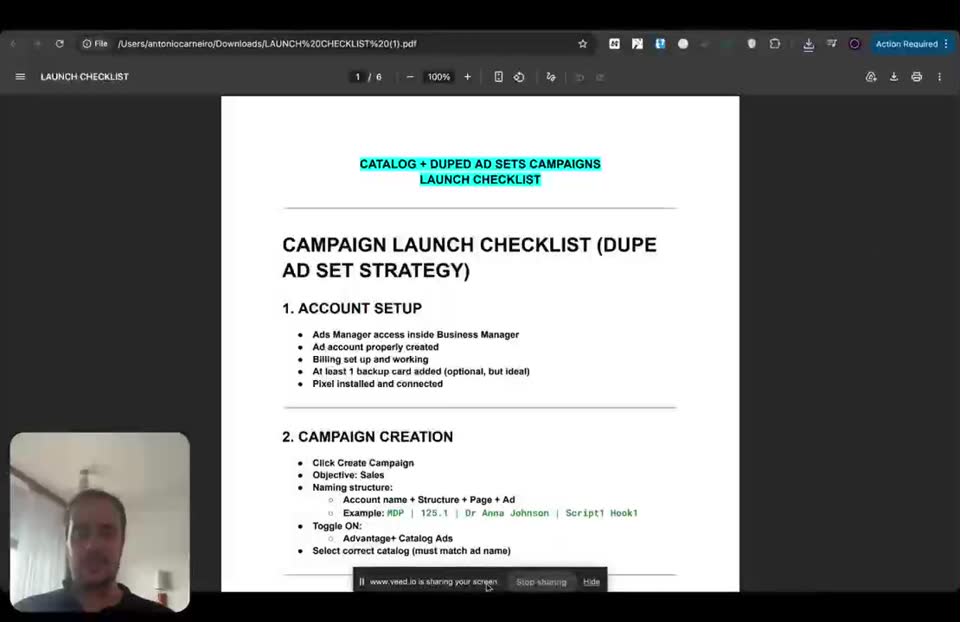
Verify account setup and configure initial campaign creation settings in the Ads Manager.
- Ads Manager access = inside Business Manager
- Ad account = properly created
- Billing = set up and working
- Backup card = At least 1 added
- Pixel = installed and connected
- Objective = Sales
- Naming structure = Account name + Structure + Page + Ad
- Advantage+ Catalog Ads = ON
- Select correct catalog = must match ad name
To double-check everything is there before launching your ads.
Step 200:30 to 00:40
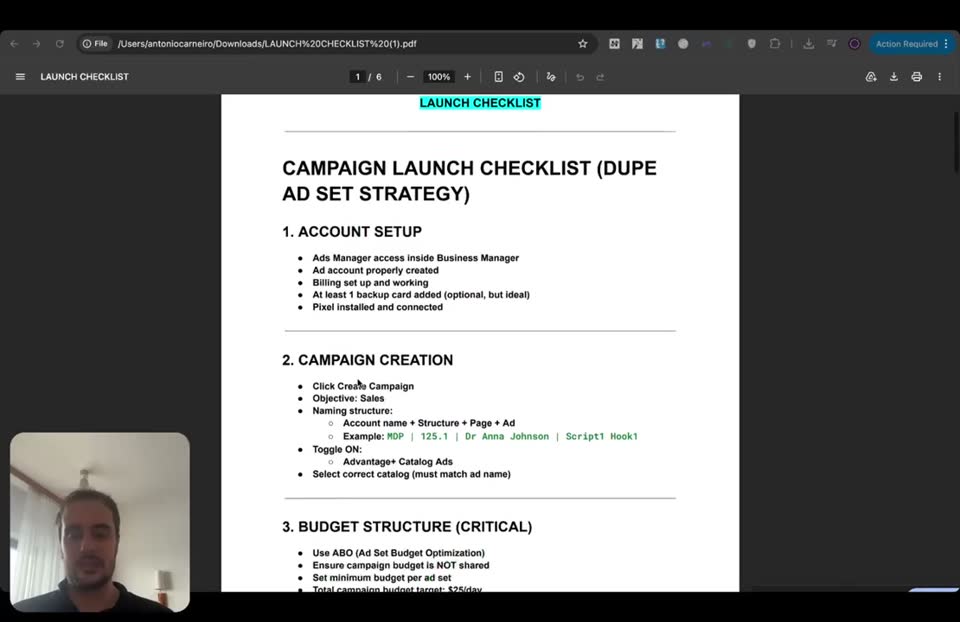
Set up the critical budget structure using Ad Set Budget Optimization.
- Budget Optimization = Use ABO (Ad Set Budget Optimization)
- Campaign budget = NOT shared
- Budget per ad set = Set minimum budget
- Total campaign budget target = $25/day
- Calculate ad sets needed = If $1 minimum -> 25 ad sets
This is very important because that's what we recommend for the budget structure.
Step 300:40 to 00:58
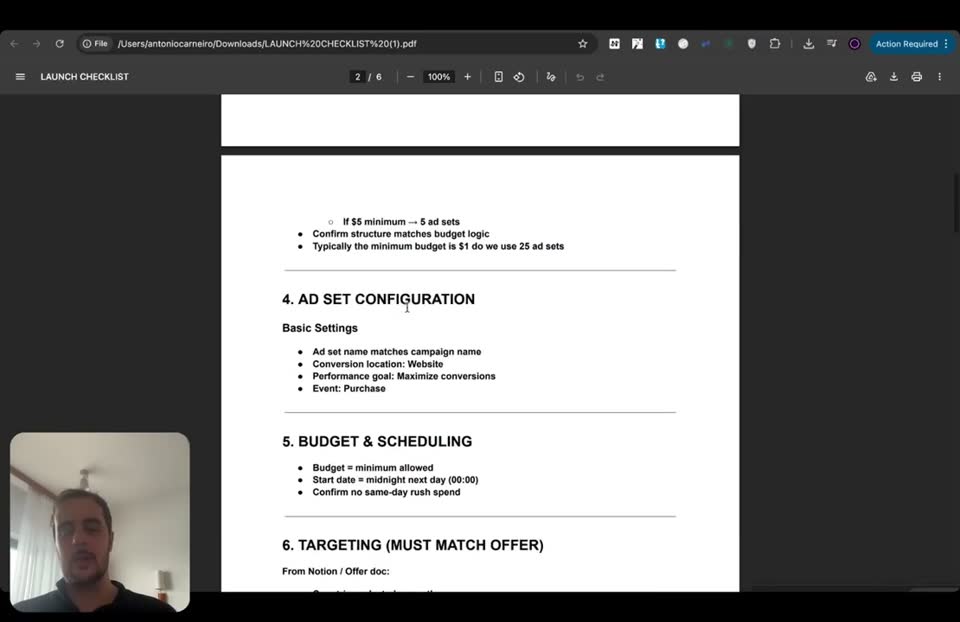
Configure ad set basic settings, budget scheduling, and targeting to match the offer.
- Calculate ad sets needed = If $5 minimum -> 5 ad sets
- Ad set name = matches campaign name
- Conversion location = Website
- Performance goal = Maximize conversions
- Event = Purchase
- Budget = minimum allowed
- Start date = midnight next day (00:00)
- Countries = selected correctly
- Age = matches offer
- Gender = matches offer
- Language = matches offer
Always launch for the midnight of the next day, and targeting must match the offer.
Step 400:58 to 01:15
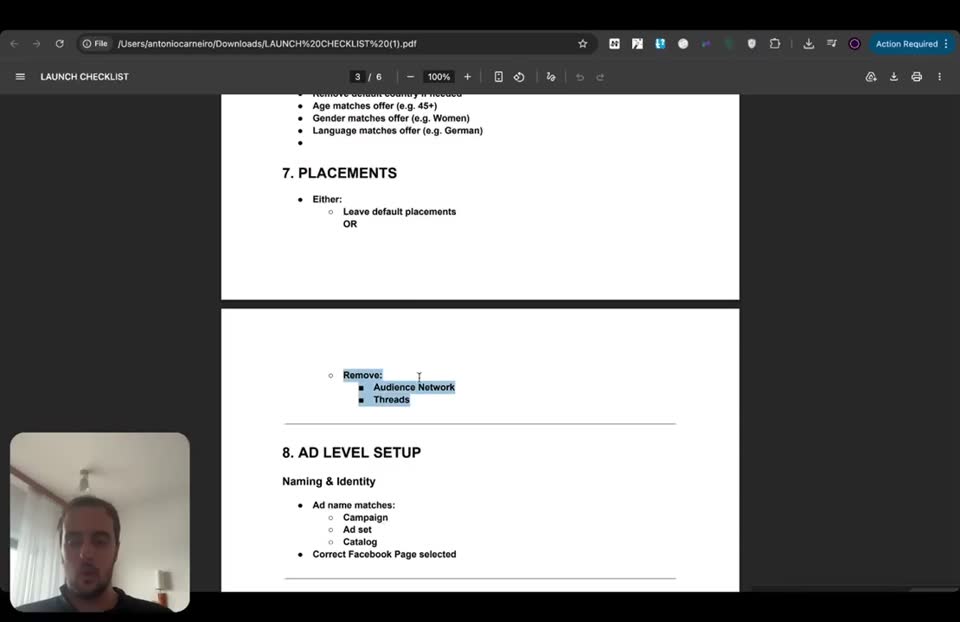
Set up placements, ad identity, destination links, and ad format.
- Placements = Leave default placements OR Remove Audience Network and Threads
- Ad name = matches Campaign, Ad set, Catalog
- Correct Facebook Page = selected
- Destination = Manual
- Insert REAL landing page link = True
- Override catalog deep links = ON
- Paste link again after override = True
- Format = Single Image or Video (NOT carousel)
The destination is critical.
Step 501:15 to 01:55
Configure dynamic media, creative settings, Advantage+ creative, and tracking parameters.
- Optimize media selection = Enable
- Prioritize video = Enable
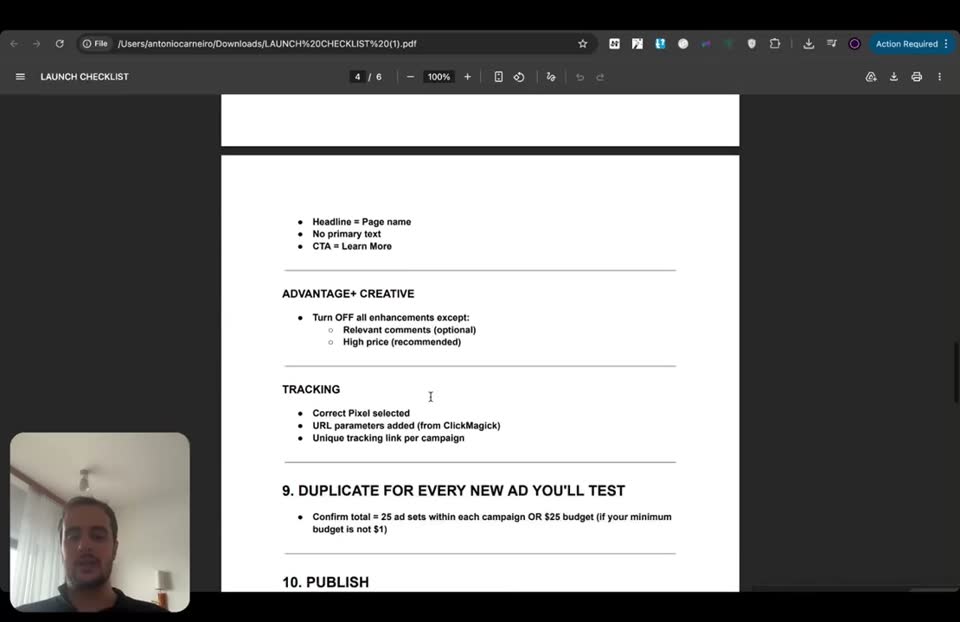
- Headline = Page name
- Primary text = No primary text
- CTA = Learn More
- Advantage+ Creative = Turn OFF all enhancements except Relevant comments (optional) and High price (recommended)
- Correct Pixel = selected
- URL parameters = added (from ClickMagick)
- Unique tracking link = per campaign
- Confirm total = 25 ad sets within each campaign OR $25 budget
- Publish = Triple check ALL settings, Click Publish, Confirm campaign is scheduled
Every campaign only has one ad, so having a unique tracking link per campaign and ad is very important.
Step 601:55 to 03:02
Create a new catalog and duplicate the campaign for every new ad you will test.
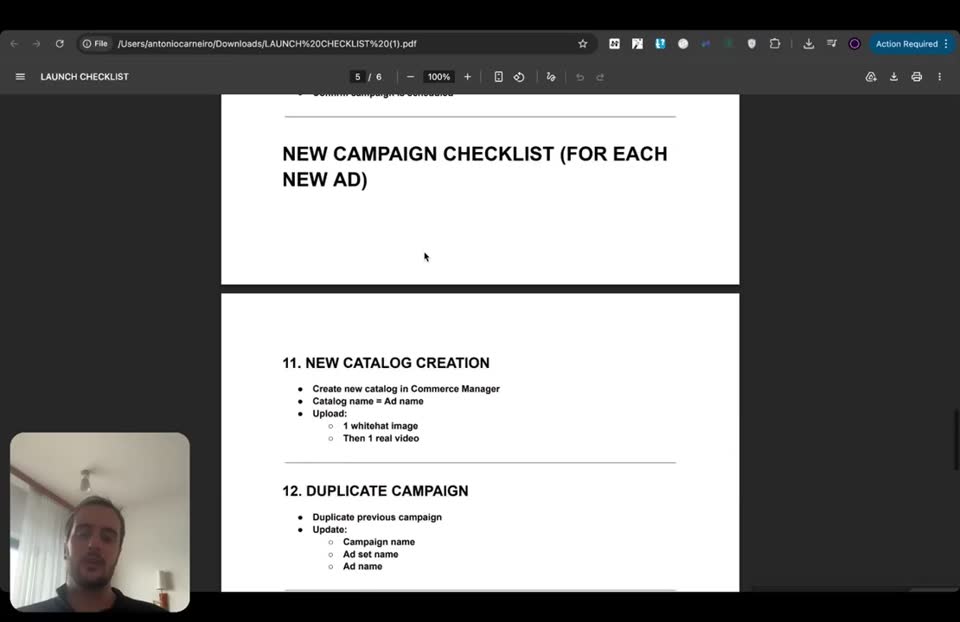
- Catalog name = Ad name
- Upload = 1 whitehat image, Then 1 real video
- Duplicate campaign = Duplicate previous campaign
- Update = Campaign name, Ad set name, Ad name
- Select NEW catalog = True
- Replace landing page link = True
- Replace override link = True
- Keep same URL parameters = True
- Ensure correct video is used in the catalog = True
- Validation Rule = 1 Catalog, 1 Ad with its own Ad Name, 1 Tracking Link
For each new campaign, you're going to have a new catalog, a new ad with its own name, and a new tracking link.
Step 703:02 to 04:36
Perform a final control check of all settings before launching any campaign.
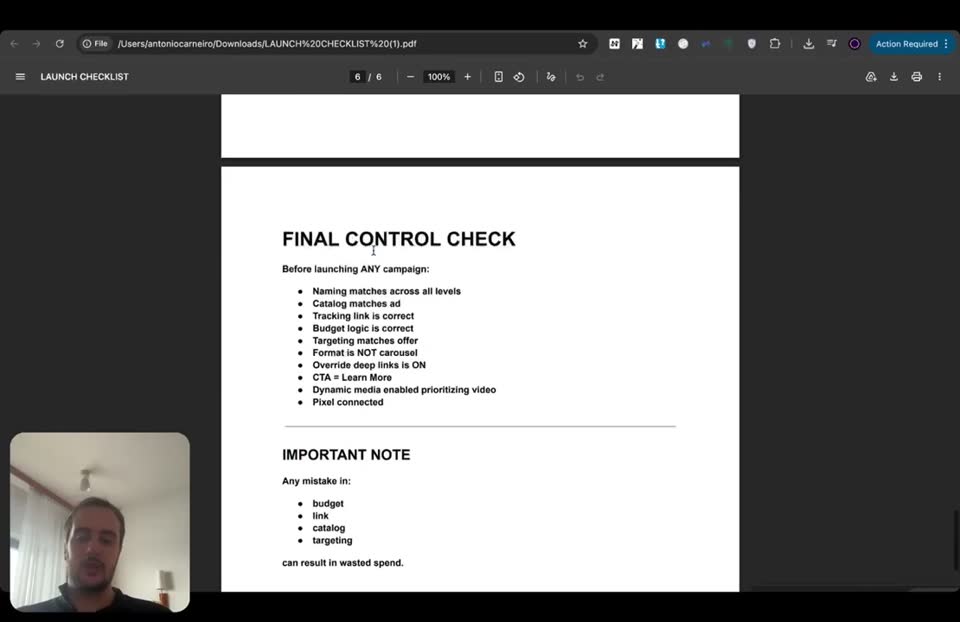
- Naming matches across all levels = True
- Catalog matches ad = True
- Tracking link is correct = True
- Budget logic is correct = True
- Targeting matches offer = True
- Format is NOT carousel = True
- Override deep links is ON = True
- CTA = Learn More = True
- Dynamic media enabled prioritizing video = True
- Pixel connected = True
Anything that you do wrong in the setup part of it can make you lose money.
Full timestamped transcript with on-screen notes
[00:00] ANTONIO: Hey guys, so I know the previous classes were very technical, obviously. So I summarized everything you need to know as a checklist that you can follow after you launch your ads, just double-check everything is there. Okay, guys? So it's just a campaign launch checklist with the dupe ad set strategy and the catalog ads. The account setup, just make sure your Ads Manager is inside your Business Manager, that you have your ad account properly created, your billing is set up and working. Ideally, you have at least one backup card added. This is optional, but it is ideal. That your pixel is installed and connected.

[SCREEN 00:00] The screen shows a PDF document titled "LAUNCH CHECKLIST (81).pdf" open in a web browser. The file path is "Users/antoniocassaro/Downloads/LAUNCH%20CHECKLIST%20(81).pdf". The document is on page 1 of 6.
The text on the document reads:
CATALOG + DUPED AD SETS CAMPAIGNS
LAUNCH CHECKLIST

CAMPAIGN LAUNCH CHECKLIST (DUPE AD SET STRATEGY)

1. ACCOUNT SETUP
- Ads Manager access inside Business Manager
- Ad account properly created
- Billing set up and working
- At least 1 backup card added (optional, but ideal)
- Pixel installed and connected

2. CAMPAIGN CREATION
- Click Create Campaign
- Objective: Sales
- Naming structure:
  - Account name + Structure + Page + Ad
  - Example: ROF | 125, 1 | Dr Anna Johnson | Script1 Hook1
- Toggle ON:
  - Advantage+ Catalog Ads
- Select correct catalog (must match ad name)

[SCREEN 00:30] The document scrolls down to show the rest of page 1 and the beginning of page 2.
The text reads:
3. BUDGET STRUCTURE (CRITICAL)
- Use ABO (Ad Set Budget Optimization)
- Ensure campaign budget is NOT shared
- Set minimum budget per ad set
- Total campaign budget target: $25/day
- Calculate ad sets needed:
  - If $1 minimum -> 25 ad sets

[00:31] ANTONIO: You have all the checklists for the campaign creation, for the budget structure. Like typically, it's a $1 minimum budget with 25 ad sets, right? So this is very, very important because that's what we recommend.

[SCREEN 00:40] The document scrolls down to show page 2.
The text reads:
  - If $5 minimum -> 5 ad sets
- Confirm structure matches budget logic
- Typically the minimum budget is $1.00 so we use 25 ad sets

4. AD SET CONFIGURATION
Basic Settings
- Ad set name matches campaign name
- Conversion location: Website
- Performance goal: Maximize conversions
- Event: Purchase

5. BUDGET & SCHEDULING
- Budget = minimum allowed
- Start date = midnight next day (00:00)
- Confirm no same-day rush spend

6. TARGETING (MUST MATCH OFFER)
From Notion / Offer doc:
- Countries selected correctly
  - Example: Leave only Germany, Austria, Switzerland
- Remove default country if needed
- Age matches offer (e.g. 45+)
- Gender matches offer (e.g. Women)
- Language matches offer (e.g. German)

7. PLACEMENTS
Either:
- Leave default placements
OR

[00:42] ANTONIO: You have all the ad set configurations, including the budget and the scheduling. So always launch for the midnight of the next day. Targeting, just must match the offer, very important. And then placements, you have the option to either leave the default placements or remove Audience Network and Threads. Both work. Okay?

[SCREEN 00:58] The document scrolls down to show the end of page 2 and the beginning of page 3.
The text reads:
- Remove:
  - Audience Network
  - Threads

8. AD LEVEL SETUP
Naming & Identity
- Ad name matches:
  - Campaign
  - Ad set
  - Catalog
- Correct Facebook Page selected

DESTINATION (CRITICAL)
- Destination = Manual
- Insert REAL landing page link
- Toggle ON:
  - Override catalog deep links
- Paste link again after override

FORMAT
Select:
- Single Image or Video (NOT carousel)

[01:00] ANTONIO: And then in terms of ad level setup, naming and identity. The destination is critical. And then format, remember to select single image or video. Dynamic media with optimizing media selection, prioritizing the video.

[SCREEN 01:15] The document scrolls down to show the rest of page 3.
The text reads:
DYNAMIC MEDIA
- Enable:
  - Optimize media selection
  - Prioritize video

CREATIVE SETTINGS
- Headline = Page name
- No primary text
- CTA = Learn More

ADVANTAGE+ CREATIVE
- Turn OFF all enhancements except:
  - Relevant comments (optional)
  - High price (recommended)

TRACKING
- Correct Pixel selected
- URL parameters added (from ClickMagick)
- Unique tracking link per campaign

9. DUPLICATE FOR EVERY NEW AD YOU'LL TEST
- Confirm total = 25 ad sets within each campaign OR $25 budget (if your minimum budget is not $1)

10. PUBLISH
- Triple check ALL settings
- Click Publish
- Confirm campaign is scheduled

[01:16] ANTONIO: And then in terms of creative settings, just the headline is just equal to your page name. For example, Dr. Anna Johnson. The CTA is just Learn More. That you turn off all the enhancements except relevant comments and high price. And finally, for tracking, that the correct pixel is selected, the URL parameters are added from ClickMagick, and you have a unique ClickMagick tracking link per campaign and obviously per ad, because every campaign only has one ad. Right? So that's all very important. And then after that, you can just publish. Just triple-check everything. This is honestly, guys, just a checklist for you guys to triple-check everything. So it's everything we saw in the previous classes, but just summarized in a document. So you guys are going to see all of that in the document.

[SCREEN 01:55] The document scrolls down to show page 4.
The text reads:
NEW CAMPAIGN CHECKLIST (FOR EACH NEW AD)

11. NEW CATALOG CREATION
- Create new catalog in Commerce Manager
- Catalog name = Ad name
- Upload:
  - 1 whitehat image
  - Then 1 real video

12. DUPLICATE CAMPAIGN
- Duplicate previous campaign
- Update:
  - Campaign name
  - Ad set name
  - Ad name

13. UPDATE KEY ELEMENTS
- Select NEW catalog
- Replace landing page link
- Replace override link
- Keep same URL parameters
- Ensure correct video is used in the catalog

14. VALIDATION RULE (VERY IMPORTANT)
Each campaign must follow its own:
- 1 Catalog
- 1 Ad with its own Ad Name
- 1 Tracking Link

Everything must match.

[01:57] ANTONIO: And then for every new campaign you run, it also has all the checklists that you need to know. So you're going to have a new catalog with another ad that matches the ad name and obviously has another real video, right? So the other ad that you actually created that you're uploading in your catalog. That you're duplicating the campaign initially. That you're updating the key elements. So you're updating the catalog, you're replacing the landing page link with your tracking link, you're replacing the override link, you're keeping the same URL parameters, and you're ensuring the correct video is used in the catalog. Now this is something that people frequently make a mistake on when using catalog, right? So your naming convention for your catalog just needs to match your ad naming convention. Each catalog is just one ad, remember. And obviously each catalog is composed of the same white hat image, it doesn't need to be different, but then also the real video that you want to test. Right? And then validation rule also very important. For each new campaign, you're going to have a new catalog, a new ad with its own name, and a new tracking link, just like Chris showed you guys. Right?

[SCREEN 03:02] The document scrolls down to show page 5.
The text reads:
FINAL CONTROL CHECK
Before launching ANY campaign:
- Naming matches across all levels
- Catalog matches ad
- Tracking link is correct
- Budget logic is correct
- Targeting matches offer
- Format is NOT carousel
- Override deep links is ON
- CTA = Learn More
- Dynamic media enabled prioritizing video
- Pixel connected

IMPORTANT NOTE
Any mistake in:
- budget
- link
- catalog
- targeting

can result in wasted spend.

[03:03] ANTONIO: And then you have the final control check. So honestly guys, this is just remembering everything we did so far in this module. You're going to have a 7-day plan as well. But this is pretty much the checklist so you can see if there's anything that you forgot. You can just use it in the beginning, then eventually it's probably going to become second nature. But especially for the first couple weeks, it's going to take some time to remember all of that. I know there is a lot, like even myself sometimes I'm trying to remember one or two things because it can be a lot of little details. And honestly, anything that you do wrong in the setup part of it, it can make you lose money as well. Right? So that's why it's so, so important. That's why this is top, top, high-level strategies that top affiliates use, because it's not easy. If it were easy, everybody would be millionaires. Right? And you can use this for all the campaigns that you run in your life, even if it's not just in this space, just with our winning offers, obviously. And I can guarantee you it's going to help you a lot because once again, the secret catalog method helps you not getting ads rejected. The duped ad sets method helps you getting better results for almost any niches and any campaigns. Obviously, it's always something you need to test. And you're going to see in the later modules, we're going to teach you also to test different structures, because even the ad structure is something that we test, right? And we have to teach you how to test it. But that's the initial structure that in the long run, for most accounts, we've seen crushing. Having said that, like I always tell you guys, every new ad account can have a different performance, right? And that's why in the next class, I'm going to show you how to test each asset's variable as well. Not just the creatives, how to keep testing creatives, sure, but also how to test the new assets. So when and how to test accounts, when and how to test offers, and all that fun stuff. But this is just the launch checklist, so the very technical checklist for you to do that. So hopefully it was helpful, just to supplement everything we already saw in practice in the previous classes.
Recording 5 7 POST Launch Check List.mp4. Gemini video pass. Rebuilt 31 Oct 2026 15:24 Melbourne.