
Module 5: Going Live, lesson 5.2
Million Dollar Testing Protocol
8 steps18:27 long10 rules
This lesson introduces the Million Dollar Testing Protocol, a strict three-stage framework for evaluating Facebook ad performance. It teaches how to use specific spend thresholds ($15-$20, $50, and $170) as decision gates to either kill or scale campaigns. The coach explains which metrics to track at each stage, including Cost Per Click (CPC), Cost Per Engagement (CPE), and Cost Per Acquisition (CPA). Finally, it clarifies exactly where to find this data, using Facebook Ads Manager for CPC and ClickMagick for engagements and sales.
Campaign structureAll spend and decisions are monitored at the campaign level across multiple duplicate ads (e.g., 25 or 50 duplicates of the same ad within the campaign). Recommended daily ad spend is $20-$50/day per ad test. Test 3 ads at a time (launch 3 new creatives per test batch).
Rules and numbers
- Target CPC is $1.50 to $2.00 USD, with a hard cut-off at $2.00 USD.
- Target CPE (Cost Per Engagement) is below $50 USD, with a hard cut-off at $50 USD.
- Average CPA is 150 EUR or $170 USD, with a hard cut-off at $170 USD.
- Level 1: Check CPC at $15-$20 spend; kill if above $2.00 USD.
- Level 2: Check engagements at $50 spend; kill if zero engagements.
- Level 3: Check sales at $170 spend (1x CPA); kill if zero sales.
- Test 3 ads at a time, launching 3 new creatives per test batch.
- Recommended daily ad spend is $20-$50/day per ad test.
- All metrics and benchmarks must be calculated in USD.
- All decisions and spend monitoring are done at the campaign level.
Gotchas
- Cost per click will show in ClickMagick, but Facebook Ads Manager is the source of truth for CPC decisions.
- Not every single sale gets attributed back into Facebook; only around 90% appear back on Facebook due to blockers or trackers.
- Sales can take up to 30 minutes to an hour to populate onto Facebook, which is why ClickMagick is used for sales data.
- If you are outside the US, you must convert your local currency spend to USD to match the testing thresholds.
- If an ad gets 1 engagement at $50 spend, you let it run to $170, expecting the cost per engagement to drop as it spends more.
“You think of these like gates. The first gate your ad gets to is at $15 to $20 spend and you look at the cost per click.”
“Just like a conveyor belt, right? You've got apples coming through, you take the rotten apples out, you let the good apples go.”
“All of this spend is at the campaign level. So we make all the decisions at the campaign level, we don't look into the ad level.”
Step 100:00 to 01:13
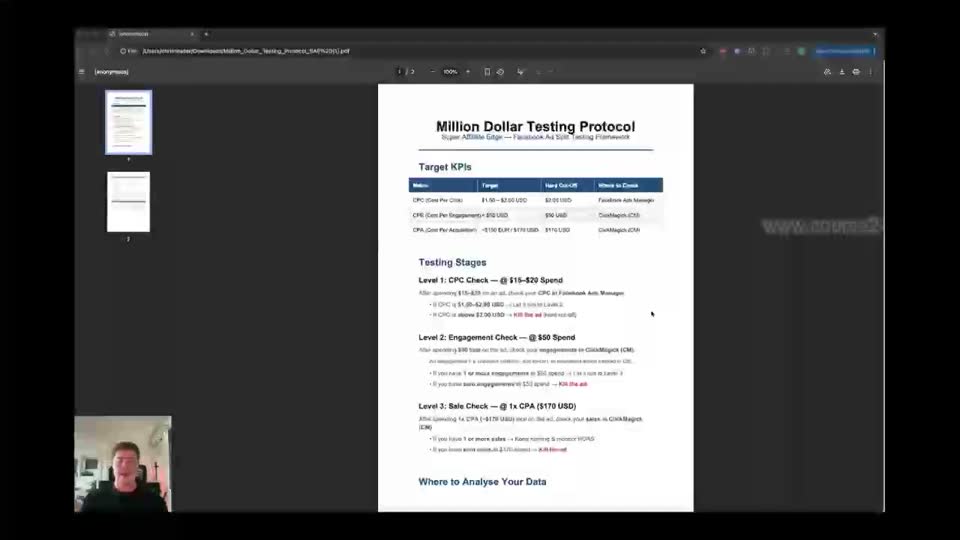
Review the Target KPIs and Testing Stages in the PDF document.
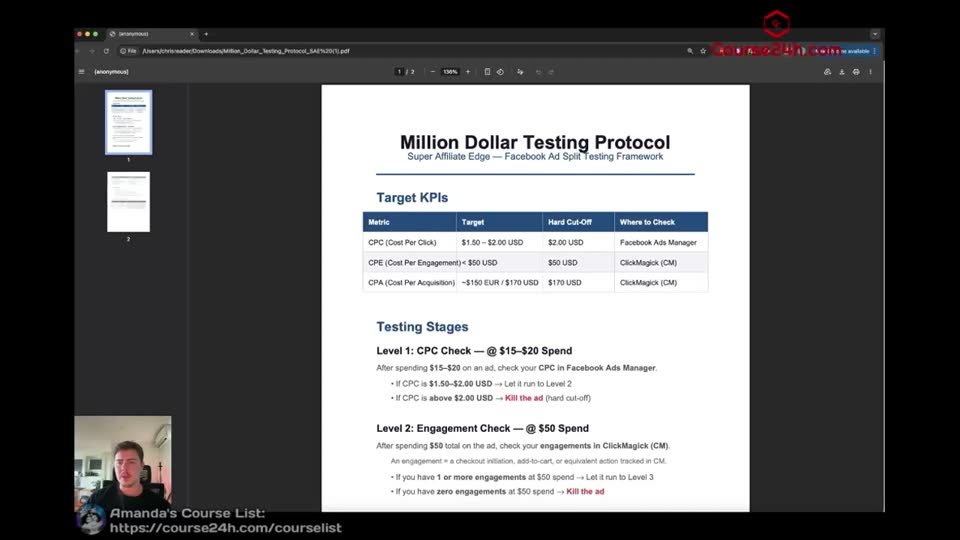
- CPC (Cost Per Click) = $1.50 - $2.00 USD | $2.00 USD | Facebook Ads Manager
- CPE (Cost Per Engagement) = $50 USD | [blank] | $50 USD | ClickMagick (CM)
- CPA (Cost Per Acquisition) = $150 EUR / $170 USD | [blank] | $170 USD | ClickMagick (CM)
- Level 1: CPC Check = @ $15-$20 Spend
- Level 2: Engagement Check = @ $50 Spend
- Level 3: Sale Check = @ 1x CPA ($170 USD)
To understand the key performance indicators and the exact decisions needed to keep an ad on or turn it off.
Step 201:13 to 09:13
Click the download icon in the top right corner of the PDF viewer.
To save and print the protocol for easy reference when managing multiple ads.
Step 309:13 to 10:23
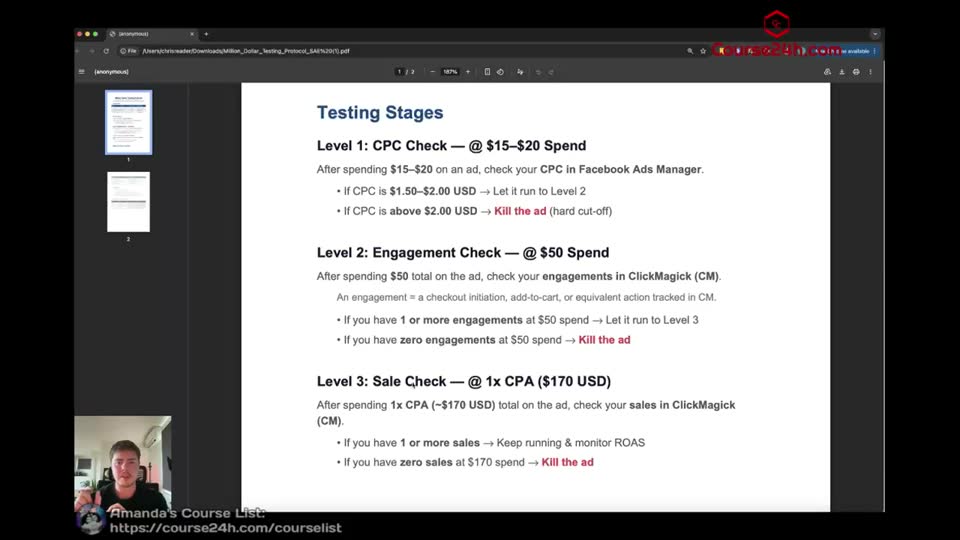
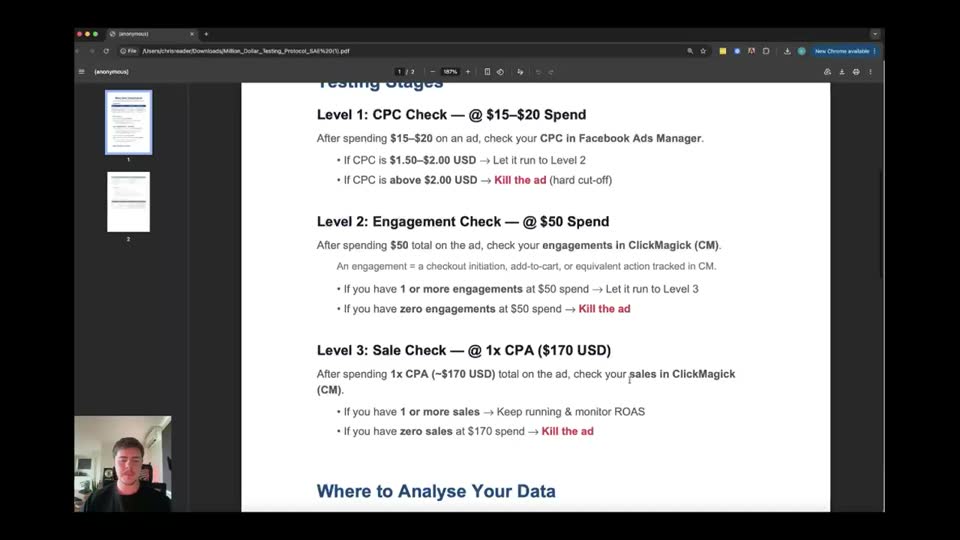
Review the detailed Testing Stages rules in the document.
- Level 1: CPC Check = @ $15-$20 Spend
- If CPC is $1.50-$2.00 USD = Let it run to Level 2
- If CPC is above $2.00 USD = Kill the ad (hard cut-off)
- Level 2: Engagement Check = @ $50 Spend
- If you have 1 or more engagements at $50 spend = Let it run to Level 3
- If you have zero engagements at $50 spend = Kill the ad
- Level 3: Sale Check = @ 1x CPA ($170 USD)
- If you have 1 or more sales = Keep running & monitor ROAS
- If you have zero sales at $170 spend = Kill the ad
To memorize the exact spend thresholds and actions required at each gate.
Step 410:23 to 11:31
Scroll down to view the Where to Analyse Your Data section.
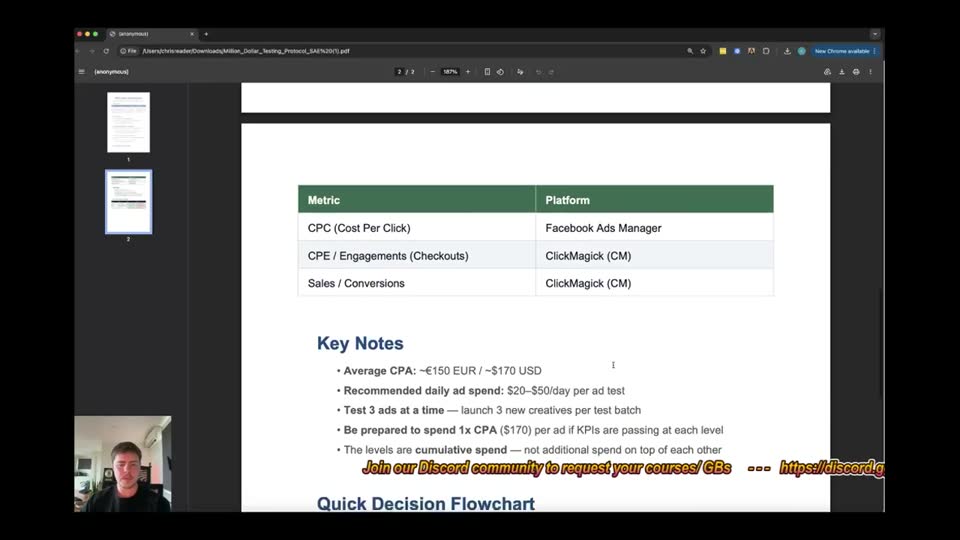
- Metric = Platform
- CPC (Cost Per Click) = Facebook Ads Manager
- CPE / Engagements (Checkouts) = ClickMagick (CM)
- Sales / Conversions = ClickMagick (CM)
To know which platform acts as the source of truth for each specific metric.
Step 511:31 to 12:38
Scroll down to view the Key Notes section.
- Average CPA = ~€150 EUR / ~$170 USD
- Recommended daily ad spend = $20-$50/day per ad test
- Test 3 ads at a time = launch 3 new creatives per test batch
- Be prepared to spend 1x CPA ($170) per ad = if KPIs are passing at each level
- The levels are cumulative spend = not additional spend on top of each other
To understand the budget requirements and testing volume expectations.
Step 612:38 to 14:13
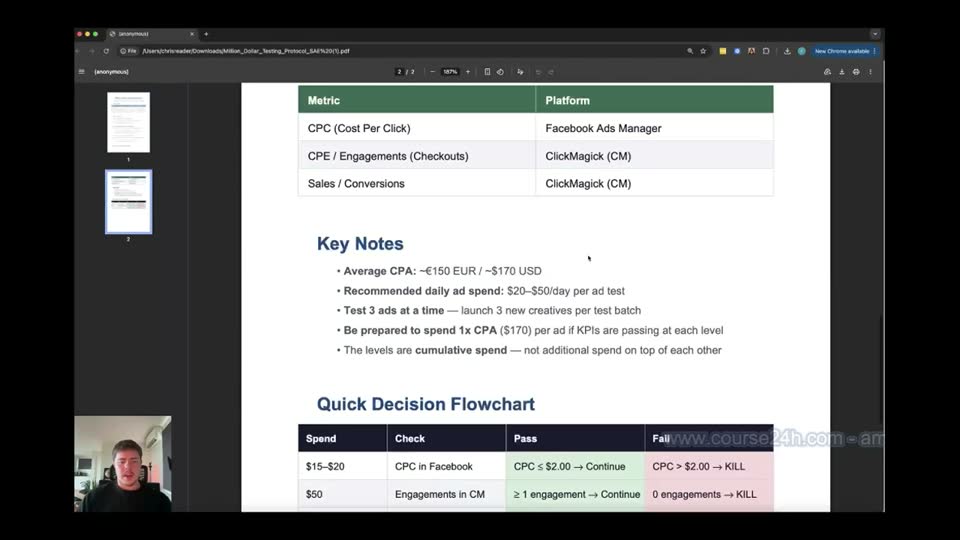
Scroll down to view the Quick Decision Flowchart.
- Spend = Check | Pass | Fail
- $15-$20 = CPC in Facebook | CPC < $2.00 -> Continue | CPC > $2.00 -> KILL
- $50 = Engagements in CM | ≥ 1 engagement -> Continue | 0 engagements -> KILL
- $170 (1x CPA) = Sales in CM | ≥ 1 sale -> Keep & Scale | 0 sales -> KILL
To have a simplified visual reference for the daily ad optimization process.
Step 714:13 to 17:48
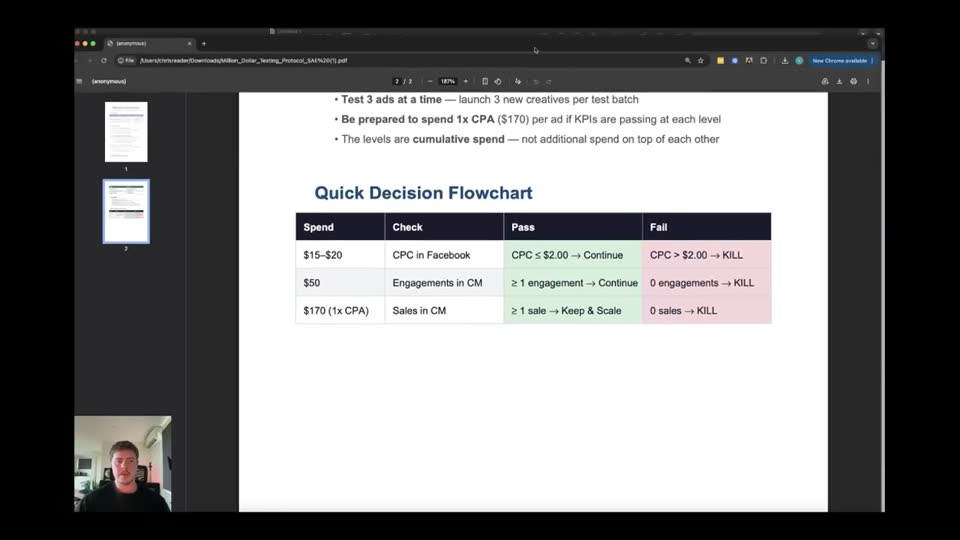
Review the ClickMagick dashboard to analyze campaign metrics.
- Date range = Mar 28, 2023 - Mar 28, 2023
- Attribution = Any
- Source = Any
- Medium = Any
- Campaign = Any
- Term = Any
- Content = Any
- Clicks = 152
- CPC = $0.95
- EPC = $1.15
- Cost = $144.20
- Refunds = $0.00
- Profit = $30.80
- ROAS = 1.21
- ROI = 21%
- Actions = 0
- ACR = 0.0%
- CPA = $0.00
- Revenue = $175.00
- Initial = $175.00
- Upsell = $0.00
- Backend = $0.00
- Recurring = $0.00
- Engaged = 5
- ECR = 3.3%
- CPE = $28.84
- EPE = $35.00
- Sales = 1
- SCR = 0.7%
- CAC = $144.20
- AOV = $175.00
- Customers = 1
- NewCust = 1
- RepeatCust = 0
- LTV = $175.00
To locate engagements, CPE, and sales data in ClickMagick for making Level 2 and Level 3 decisions.
Step 817:48 to 18:25
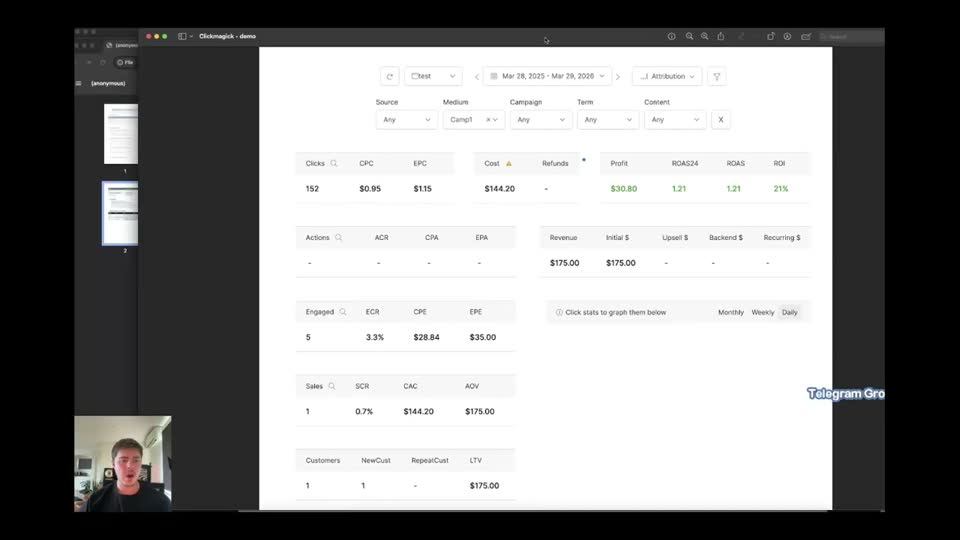
Scroll back to the top of the Million Dollar Testing Protocol document.
- Metric = Target | Hard Cut-off | Where to Check
- CPC (Cost Per Click) = $1.50 - $2.00 USD | $2.00 USD | Facebook Ads Manager
- CPE (Cost Per Engagement) = < $50 USD | $50 USD | ClickMagick (CM)
- CPA (Cost Per Acquisition) = ~€150 EUR / ~$170 USD | $170 USD | ClickMagick (CM)
Full timestamped transcript with on-screen notes
[SCREEN 00:00] A PDF document is displayed in a web browser.
Title: Million Dollar Testing Protocol
Subtitle: Super Affiliate Edge - Facebook Ad Split Testing Framework
Table: Target KPIs
Columns: Metric, Target, Hard Cut-Off, Where to Check
Row 1: CPC (Cost Per Click) | $1.50 - $2.00 USD | $2.00 USD | Facebook Ads Manager
Row 2: CPE (Cost Per Engagement) = $50 USD | [blank] | $50 USD | ClickMagick (CM)
Row 3: CPA (Cost Per Acquisition) = $150 EUR / $170 USD | [blank] | $170 USD | ClickMagick (CM)
Section: Testing Stages
Level 1: CPC Check — @ $15-$20 Spend
After spending $15-$20 on an ad, check your CPC in Facebook Ads Manager.
- If CPC is $1.50-$2.00 USD -> Let it run to Level 2
- If CPC is above $2.00 USD -> Kill the ad (hard cut-off)
Level 2: Engagement Check — @ $50 Spend
After spending $50 total on the ad, check your engagements in ClickMagick (CM).
An engagement = a checkout initiation, add-to-cart, or equivalent action tracked in CM.
- If you have 1 or more engagements at $50 spend -> Let it run to Level 3
- If you have zero engagements at $50 spend -> Kill the ad
Level 3: Sale Check — @ 1x CPA ($170 USD)
After spending 1x CPA (~$170 USD) total on the ad, check your sales in ClickMagick (CM).
- If you have 1 or more sales -> Keep running & monitor ROAS
- If you have zero sales at $170 spend -> Kill the ad
Section: Where to Analyse Your Data (partially visible)

[00:00] CHRIS: Hey everyone, in this video here, I'm going to be walking you through the testing protocol. Okay, we call this the million dollar testing protocol because this is the exact framework that you must follow on every single ad that you run. Okay, so this is going to be like the bread and butter of your decision making. This lists every single decision you need to make and when you need to make it. Okay, so this is one of the most important videos because you need to understand first what the KPIs are we're looking for, right? KPI stands for key performance indicators because these are indicators which allow us to know if our ad is performing good or bad. Okay, and then it tells us the exact decisions we need to make on whether to keep the ad on or turn the ad off. So you can download this testing protocol in the download section below. And I have heard from some people that they're struggling to understand how to download it. So once you select the download button below, it will take you to a screen like this. Okay, so this is like in a web browser. All you need to do is click this button here in the top right, this download button.

[SCREEN 01:08] The cursor hovers over the download icon in the top right corner of the PDF viewer.

[01:09] CHRIS: And what that will do, if I click it, is it will, it will then go into your downloads on your computer.

[SCREEN 01:13] The cursor clicks the download icon.

[01:15] CHRIS: Alright, so I highly recommend you download this and even print this out. Okay, so me and Antonio, the way we run ads is we have a specific protocol. We have, you know, we, we simplify all of the decisions we need to make into a very simple step-by-step process. So that way when you're running ads and eventually when you start running a lot of ads, it's very easy to manage because you just have simple yes or no answers and decisions you need to make. Okay, so in this video, I'm going to walk you through the million dollar testing protocol. And I'm then also going to explain how to actually find the data here and show you where to look for each thing in your ClickMagick and show you a ClickMagick demo of how things look in ClickMagick so you know the exact process. Alright, so first let's talk about the target KPIs.

[SCREEN 02:04] The cursor highlights the text "Target KPIs".

[02:06] CHRIS: So these are the metrics we look at to know if our ad is performing or not. So we have three main metrics we look at. Cost per click, aka CPC. Cost per engagement, aka CPE. And what engagement means, engagement means a checkout. So if someone's actually, you know, clicked through, that's the first step. And then they've actually gone to the checkout. Okay, right, so obviously the importance of like the waterfall effect here guys is that obviously we want to make sure our ad is performing well and that means that we're getting a good cost per click. Okay, and then if our ad is getting, you know, lots of clicks, we want to make sure we're getting checkouts, which are engagements. And then the next one here is CPA, which means cost per acquisition. Okay, now the target for cost per click here is $1.50 to $2. So this is the goal that we want. Typically we will see anywhere between like a dollar to two dollars on our ads that are performing well. But we have a target here of $1.50 to $2. Okay, so you know, your ad can still be very, very profitable at $1.50 or even $1.70. But obviously the lower the cost per click, the better. And we have our hard cut off at $2. So anything higher than $2 in our cost per click means it's not a good ad. Same for cost per engagement, right? We want anything below $50. So we want to be spending, you know, below $50 to get a checkout slash engagement. And our hard cut off here is $50. Okay, so if you spend $50 without getting a checkout, we turn the ad off. Even if it's got a good cost per click. So then the ad goes to the CPA. So our average CPA that we're going to get guys is 150 euros, which is around $170 USD. So if we spend $170 USD without a sale, we turn it off. Now the way you find these is you find the cost per click in Facebook Ads Manager and you can see the engagement in ClickMagick and you can see your sales in ClickMagick as well. And I'll show you this in a moment. Alright, so this is just a little like cheat sheet here, but now these are the testing stages which give you the exact decision making process.

[SCREEN 04:17] The cursor highlights the text "Testing Stages".

[04:21] CHRIS: So level one is where we check the cost per click.

[SCREEN 04:24] The cursor highlights the text "Level 1: CPC Check — @ $15-$20 Spend".

[04:27] CHRIS: And we do this when we spend around $15 to $20. Now if you're more conservative, you can do it at 15 or you could just do it at 20. So that's why there is this two levels here. Anywhere between here is completely fine. So after spending around $15 to $20 on an ad, you want to check your cost per click in Facebook. If the cost per click is $1.50 to $2 or below, okay, so or below, this is completely fine if it's below $1.50, you let it run to level two. If the cost per click is above $2, you kill the ad. Alright, now this is very important because sometimes, you know, we see people spend upwards of $100 on an ad that has really bad cost per click. And at that point you're wasting money guys. So these are like your thresholds. You think of these like gates. Okay, the first gate you ever get to, your ad gets to, is at $15 to $20 spend and you look at the cost per click. Is it below, you know, is it below $1.50 or $2? If yes, you let it continue to the next gate. If not, you turn it off. The next gate here is the engagements.

[SCREEN 05:32] The cursor highlights the text "Level 2: Engagement Check — @ $50 Spend".

[05:36] CHRIS: Okay, this is also, you can see it an initiate checkout, add to cart or the equivalent action, which is engagements. So this we check at $50. Okay, so right, the only way you can get to level two is if your cost per click is good. Then at level two, you let it spend to $50 and you check your ad. Okay, so if you have one or more engagements or checkouts at $50 spend, it's now passed that gate and you let it run to level three. If you have zero engagements at that ad on $50 spend, you kill the ad, so you turn it off and you do not let it spend anymore. Then if it has got a good cost per click, if it's got a good cost per checkout or cost per engagement, then it will get to level three.

[SCREEN 06:10] The cursor highlights the text "Level 3: Sale Check — @ 1x CPA ($170 USD)".

[06:17] CHRIS: And at this point we let it run to $170. So it's, we let this run to one times cost per acquisition. So if on average we're making $170 per sale, we let it run to $170 because this way, if it makes a sale on like $165, we're breaking even, which is good. Okay, so obviously ideally we want to get more sales within there, but we want to give it initial breathing room to see if it's going to perform. So that's why we have it set at this level. So after spending one times CPA, which in this case is $170 USD total on the ad, you check your sales. So if it has one or more sales, great, keep it running and monitor ROAS, okay, which is return on ad spend. If you have zero sales at $170 spend, you just turn the ad off. Okay, it doesn't matter if you have heaps of engagements, it doesn't matter if the cost per click is great, you turn it off, you follow this. Alright, so this is the process we follow. Every single ad goes through this. Okay, now one thing that's really important to note as well here is all of these decisions are done at the campaign level. So because of the strategy that we're using to run ads, since we're doing multiple duplicates of the ad within the campaign that Antonio has discussed, okay, it's really important you get your head around this. All of this spend is at the campaign level. So if we've got for example video ad one hook three, okay, and it is, you know, got 25 duplicates or 50 duplicates or whatever stage you're at, we monitor and we turn things off at the campaign level. So we make all the decisions at the campaign level, we rarely, we don't look into the ad level. So if your campaign itself has spent $50, you know, across all of those duplicate ads, you make the decision and you turn the campaign off. Alright, um, one thing also that is important to know is as you go through, you know, the goal here is you basically act like a conveyor belt guys. You, you launch your ads and then you just check at $20 you check for CPC, at $50 you check for checkouts and engagements, at $170 you check for sales. And you just have it like this, think about it like a conveyor belt. And everything that gets to your, to the $20 gate, you either turn off or let through. Just like a conveyor belt, right? You've got apples coming through, you take the rotten apples out, you let the good apples go, right? You just think of it like a conveyor belt. And this is what creates the process to be really easy because even if you're running, for example in the future, you know, when you guys scale up, you could be running 50 ads and 50 campaigns. And you might think, oh, that's a lot to manage. But when you just simplify the process to three gates that you look at, it's very simple, right? Like a conveyor belt, you could have a thousand apples going down that conveyor belt and you just know...
[09:13] COACH: Apples going down that conveyor belt and you just know exactly what to remove. That's the process that we have here. All right. And obviously, you know, you want to be testing heaps of ads, okay, following the, you know, testing heaps of the versions of our scripts, right? Whether it's new hooks, whether it's new unique bodies, you create your ads like we've taught in the prior modules and then you test them and every ad goes through this. Okay. And guys, even if you're like duplicating campaigns and scaling campaigns, even if it's like a winning campaign but you've duplicated it now, it still follows this process. Okay. And then what we'll get to in one of the following videos is then, you know, the evolution method. Okay. So then taking, you know, an ad that, right, maybe it is getting a lot of engagements but no sales, well then you can evolve that ad. Um, and we can, we can discuss that process as well. We will get to an entire video, uh, in that in the module where we're optimizing and scaling like a pro. But to begin with, since you're already basing so many of your ads on our winners, um, you know, you just keep testing different variations of those winners, different winners that we have until you find one that's performing well. All right.

[SCREEN 09:13] A Google Doc is shown on screen. The visible text is:
Testing Stages
Level 1: CPC Check — @ $15-$20 Spend
After spending $15-$20 on an ad, check your CPC in Facebook Ads Manager.
If CPC is $1.50-$2.00 USD -> Let it run to Level 2
If CPC is above $2.00 USD -> Kill the ad (hard cut-off)
Level 2: Engagement Check — @ $50 Spend
After spending $50 total on the ad, check your engagements in ClickMagick (CM).
An engagement = a checkout initiation, add-to-cart, or equivalent action tracked in CM.
If you have 1 or more engagements at $50 spend -> Let it run to Level 3
If you have zero engagements at $50 spend -> Kill the ad
Level 3: Sale Check — @ 1x CPA ($170 USD)
After spending 1x CPA (~$170 USD) total on the ad, check your sales in ClickMagick (CM).
If you have 1 or more sales -> Keep running & monitor ROAS
If you have zero sales at $170 spend -> Kill the ad

[10:23] COACH: Now, where to analyze your data. Again, cost per click you see directly in Facebook Ads Manager. Your cost per click will also show in ClickMagick, but Facebook Ads Manager is the source of truth. So even though it says cost per click in your ClickMagick, you always make that decision in Facebook. Cost per engagement or checkouts is in ClickMagick, and then your sales and conversions are also in ClickMagick. The reason why we look at our sales and conversions in ClickMagick is because sometimes not every single sale gets attributed back into Facebook, which is completely normal. So if you guys see some sales in ClickMagick that you don't see on your Facebook ad account, firstly, sometimes it can take up to 30 minutes, even to an hour to populate it onto Facebook. But secondly, only around 90% of your sales will actually appear back on Facebook. So that's why we monitor it on ClickMagick, because ClickMagick is, you know, getting that data directly from Digistore. Now, the reason why some of the sales don't send back to Facebook is because some people have certain blockers or trackers where it can't actually attribute the sale back to back to Facebook. Okay.

[SCREEN 10:23] The document is scrolled down. The visible text is:
Where to Analyse Your Data
Metric | Platform
CPC (Cost Per Click) | Facebook Ads Manager
CPE / Engagements (Checkouts) | ClickMagick (CM)
Sales / Conversions | ClickMagick (CM)

[11:31] COACH: Now, key notes here. Okay. Um, you know, our average CPA is going to be 170 US dollars. Also what's really important guys is these metrics are all in USD. So if you're in Australia, you need to do the, you know, the math. If you're in, you know, wherever, whatever country, you need to figure out what are these benchmarks based on, um, USD. So for example, it's 15 to 20 USD in spend. Um, right. Like if you were to look at that at Australian dollars, you know, something like you would be spending, you know, if you only spent 20 Australian dollars, that's really the only the equivalent of like, for example, if you only spent 15 Australian, that's the equivalent to like 10 US, which is not enough money to make a decision. So all of these numbers here are all in US. And like, you know, if you're in like Zimbabwe or something, this would probably be like, you know, 5,000 Zimbabwe dollars to equal the 50 spend. Okay. So it needs to be translated to US dollars.

[SCREEN 11:31] The document is scrolled down. The visible text is:
Key Notes
Average CPA: ~€150 EUR / ~$170 USD
Recommended daily ad spend: $20-$50/day per ad test
Test 3 ads at a time — launch 3 new creatives per test batch
Be prepared to spend 1x CPA ($170) per ad if KPIs are passing at each level
The levels are cumulative spend — not additional spend on top of each other

[12:38] COACH: Um, you know, we always recommend testing three ads at a time. And again, guys, be prepared to spend up to one times CPA if the KPIs are passed each level. So never ever are we just spending 170 US dollars on an ad that isn't getting a lot of engagements. So you need to think we're not waste, we don't want to waste money here. You know, never let your ad spend 170 US dollars if it does not have, you know, engagements at, at or under $50 spent. Okay. Now, one thing to note is if your ad gets past $50, so this is something that some of you might think of. So let's say you get one engagement at $50 spent. Okay. So it gets, you make it past this point, you run it to level three. Okay. Now this is the only time, no, well, you should still let it run to $170. Okay. But ideally the ads that we have scaling will be getting more than, you know, like as it spends, if it gets one engagement or check out at $50 and then you continue it, the chances are it's going to get more engagements and that cost per engagement is going to drop down. Hence why we run it to 170. But if you don't have any engagements at $50, you turn it off. All right. And it doesn't even get to this point at the 170. Okay.

[SCREEN 12:38] The document is scrolled down. The visible text is:
Quick Decision Flowchart
Spend | Check | Pass | Fail
$15-$20 | CPC in Facebook | CPC < $2.00 -> Continue | CPC > $2.00 -> KILL
$50 | Engagements in CM | ≥ 1 engagement -> Continue | 0 engagements -> KILL
$170 (1x CPA) | Sales in CM | ≥ 1 sale -> Keep & Scale | 0 sales -> KILL

[14:00] COACH: And here is a quick decision flowchart for you guys. Okay. It's just simple. Every time every any ad spends this amount, you check these and then you, you know, the passes or if you turn it off. Okay.

[14:13] COACH: All right, guys. So now I'm going to demonstrate, this is a screenshot from a demo ClickMagick account I've created for you guys. So I'm going to walk you through how to see all this data. So you can see here, this is where we can see how many clicks and what our EPC and our CPC is. Like I mentioned, this doesn't really matter that much. Okay. This doesn't really matter that much because we want to look at our cost per click in Facebook. So in ClickMagick, I'll just run you through it. This part here, our engagements, this is how many checkouts we're getting. Now, the core thing that we look at here is our CPE. Okay. This is how much we're spending to get an engagement. So if you did, you know, you know, this is how many engagements you get, well, how much money you've spent divided by how much engagements you get. Okay. So this is the metric. This one needs to be below $50. All right. Then this is our sales. Okay. This is where our sales show up. And then you can also see it says customers and stuff here. But the main things we look at in ClickMagick, guys, are our engagements, our CPE, and our sales.

[SCREEN 14:13] A screenshot of a ClickMagick dashboard is shown.
Top bar: Date range "Mar 28, 2023 - Mar 28, 2023", Attribution "Any".
Filters: Source "Any", Medium "Any", Campaign "Any", Term "Any", Content "Any".
Metrics panels:
Clicks: 152, CPC: $0.95, EPC: $1.15, Cost: $144.20, Refunds: $0.00, Profit: $30.80, ROAS: 1.21, ROI: 21%
Actions: 0, ACR: 0.0%, CPA: $0.00, Revenue: $175.00, Initial: $175.00, Upsell: $0.00, Backend: $0.00, Recurring: $0.00
Engaged: 5, ECR: 3.3%, CPE: $28.84, EPE: $35.00
Sales: 1, SCR: 0.7%, CAC: $144.20, AOV: $175.00
Customers: 1, NewCust: 1, RepeatCust: 0, LTV: $175.00

[15:23] COACH: Then in ClickMagick, it also pulls in your data, your sales number. Now for you guys, it will show euros here, but this is just a test screenshot I have to just, you know, explain everything to you. These will all be in like euros. So this will pull in your costs, how much money you've spent, and then this will show your revenue. And then obviously, your, you know, revenue minus costs equals your profit. And then you have your ROI here. Okay. So that is how you look around and navigate your dashboard in ClickMagick.

[15:58] COACH: You've also got your dates up here. So if you want to look at today's date, you would select, you know, today's date. If you would want to look at like the week, you would select the week. And then this section here, guys, this is where we've added our source, our medium, and our campaign. Now just ignore that it says campaign one here, because as you know, you know, this is your ad account where we would have tracked, this is our offer, and then this is where we would be putting in the campaign name. So if you press this little X button and this just said any, any across all of them, that would be the total cost, total profit, total ROI, total, all the stats here would be the total across every single ad that you've ran within this timeframe.

[16:43] COACH: So the way you look at individual campaigns' performances is you click into your campaign level and you will then see your campaigns. So as you know, when we did our test to see if everything's working, you know, we put in our tracking code, our UTMs, and I showed you, look, it will show you you've got a click in your campaign. So if we want to look at, you know, video one, hook five, and we just want to see only the performance for that, we would click in our campaign and select that, and it would then show the performance for that.

[17:13] COACH: So basically what we do each day, guys, is we make our decisions on Facebook, we turn off the ones that have bad CPC, then we come into here, we make sure we've got our select date, our correct date selected, we then go through each campaign. So you would select your first campaign, you would then look at the, you know, is your CPE looking good? Are you making sales? And you would make your decisions there. Then the next, then next, you go to the next campaign you're running and you do the same process. Then next, you select the next campaign you're running and you do the same process. Okay. So that is how you navigate, that is how you analyze your KPIs following the million dollar split testing protocol.

[17:48] COACH: All right. So if you guys have any questions on this, we will obviously cover them in the weekly calls. But this is basically what you'll be doing every day, right? You'll be making ads, you'll be following the split testing protocol, and you'll be analyzing the data in ClickMagick and making a decision of turning it off or leaving it on. All right. And then obviously once you have ads that are performing well and they get past level three, then we, we go into the scaling protocol. Okay. But this is the testing protocol, then the scaling protocol is the next one. All right. So that is all guys. I'll see you on the next one. Thanks.

[SCREEN 17:48] The document is scrolled up to the top. The visible text is:
Million Dollar Testing Protocol
Super Affiliate Edge — Facebook Ad Split Testing Framework
Target KPIs
Metric | Target | Hard Cut-off | Where to Check
CPC (Cost Per Click) | $1.50 - $2.00 USD | $2.00 USD | Facebook Ads Manager
CPE (Cost Per Engagement) | < $50 USD | $50 USD | ClickMagick (CM)
CPA (Cost Per Acquisition) | ~€150 EUR / ~$170 USD | $170 USD | ClickMagick (CM)
Recording 5 2 Million Dollar Split Testing Protocol GOAL KPI s How To Analyze KPIs.mp4. Gemini video pass. Rebuilt 31 Oct 2026 15:24 Melbourne.