Full timestamped transcript with on-screen notes
[00:00] Chris Reader: See and hear me in the question box there today.
[00:06] Chris Reader: Super excited to be here guys. Unfortunately I wasn't available last week, but Antonio caught me up to speed with everything and saying how good you guys are progressing.
[00:20] Chris Reader: He's also been saying how valuable all of the Loom ad account reviews have been as well. So guys remember, they're a very, very valuable asset that you guys have that you can submit one a week. So make sure you are taking advantage of those.
[00:38] Chris Reader: Because Antonio said that a lot of the people that are starting to submit those Loom reviews, it's really helping you guys with the decision-making process, right? Like how to actually navigate and make the decisions.
[00:52] Chris Reader: But just remember guys, again, all of the decision-making process comes down to the million dollar split testing protocol and the evolution method. So it's pretty much the two most fundamental ways that you're going to be able to run ads successfully and being able to know like what decision to make when.
[01:12] Chris Reader: Because even though the method that we're teaching you here guys seems pretty complex, it really is simplistic and it really only does have a couple narrow, like it's a very narrow scope of knowledge that we need to do and a very narrow scope of decisions.
[01:30] Chris Reader: So it's pretty much just, you know, high level view, it's just like we're testing heaps of ads, right? But first, need to make sure your ads actually follow the examples of the winning ads we give you, okay?
[01:42] Chris Reader: So the whole massive benefit of this group that we have here is we're giving you guys proven, literal winning ads, okay? So the scripts, you guys understand the scripts, the hooks, and the visuals, okay? So you can replicate those in your own ads.
[02:01] Chris Reader: And that's important, you know, like one of the main things that we've kind of been drilling in on these calls is like make sure your ads actually look like the ads that we are creating. Make sure you're not making any execution mistakes with like the editing or the B-roll or the opening visuals.
[02:20] Chris Reader: And then of course, testing those ads, right? So as a lot of you guys are already starting to make sales, okay? So a lot of you guys pretty much so far, I feel like most people that have ran some ads are already making sales, which is again, because you're leveraging already proven ads, so the hit rate is going to be much, much higher.
[02:43] Chris Reader: But then it still comes down to the testing protocol, right? Like you still, like just because an ad is going to be making sales or even multiple sales, you still need to follow that testing protocol. You still need to be optimizing your ads as well.
[02:58] Chris Reader: Okay. Now guys, with this process, oh sorry, so with last week since I was away, I want to do some housekeeping, okay? So I'm, you know, all of you guys writing into the support inbox, our support team is really, really good, but I'm actually, for this training, I'm actually in the support inbox myself.
[03:23] Chris Reader: So a lot of the time I'm not only answering your questions on here, but I'm literally in the support inbox answering questions as well for you guys because I want to make sure that I understand what issues you guys are having and obviously help you guys with those issues.
[03:37] Chris Reader: So a little bit of a housekeeping thing here guys, alright? Unfortunately, a lot of people, or not a lot of people I should say, but there is a handful of people out there who have been getting a different Facebook UI, right? User interface.
[03:55] Chris Reader: I don't know why every time we do something Facebook decides to change the UI for some people. So I know it's frustrating for you guys that have the new UI and so I just want to do a little bit of housekeeping here.
[04:09] Chris Reader: So the main issue with the UI we're seeing with some people is they can't select the prioritize video or the single image or video and then prioritize video. So that's the main issue we're seeing with some people.
[04:23] Chris Reader: Now if you're not seeing that issue guys, do not worry about what I'm about to say, okay? You don't need to worry about it at all because you don't have this UI, you don't have this issue.
[04:34] Chris Reader: So but what we've been seeing right is so so far in the training videos we've got a training video on how to do this for one UI and then a new UI came out, we created the training video for the second UI. So if you have either of those two UIs you're fine, everything works.
[04:51] Chris Reader: However now there is a completely new UI that someone else has, that a couple other people have shown to us, okay? Now again I understand it's frustrating and it can you know prevent your ability to get in the game and so on, but we are working on it and we actually believe we already have a solution on it like right away, which I will share in a moment.
[05:15] Chris Reader: But we have then seen with one person that we showed this solution to, they were seeing this like weird glitch or something. So I want to share it with you because I believe it works, however we haven't like 100% verified that this glitch that this person is seeing...
[05:35] Chris Reader: So basically I'm, we're not going to film a video on it right now because we've seen it work but then for someone else we saw that it didn't work. So I want to share it with you guys that are having that UI glitch just so you can test it out and then you know you can provide feedback to us.
[05:52] Chris Reader: But once we 100% nail it, we will film a video so that no matter what UI you guys have, the problem will be solved, alright? Okay.
[06:05] Chris Reader: So again, if you're not having the UI issue where you can't select prioritize video, don't worry about what I'm about to say, okay? But if you are, this is the process that we have found.
[06:19] Chris Reader: So for those who can't select prioritize video or single image or video in the ad setup, alright, you've done the UI 1 and the UI 2 videos, the way that we have found the solution is when you go into your Commerce Manager, okay, and I'm just going to, I'm just going to say this out, so either get a pen and paper down or rewatch the video here.
[06:44] Chris Reader: But it's actually very, very simple. So you go to your, you go to your Commerce Manager right, you go to where you created your catalog ad, alright? So you go into your catalog ad, first of course you know you always double check that your catalog ad has the image and the video in it, alright?
[07:03] Chris Reader: Then you click into that and then inside that catalog ad, like where it shows you you're in your catalog, there is a button that says create campaign, okay? So inside the catalog it literally has like a button on the top section that says create campaign or create campaign with catalog ad or use catalog in campaign or something along those lines, but it's clearly obvious that it's like create a campaign with this catalog ad.
[07:32] Chris Reader: When you click that, it will then open up your Ads Manager, it will then have like a loading screen saying creating campaign, and it will then create a campaign and an ad set and an ad. And the ad then will have the catalog in it and it will have the correct sort of UI where it's, instead of selecting catalog, it will select, it will allow you to select single image or video and then that is the solution that we have found, okay?
[08:08] Chris Reader: Um, obviously you would then need to actually set up the rest of the entire campaign correctly. So um, you know, you would then go into the campaign structure, set up your pixel purchase event, you would then go into the ad set and select the correct demographics, select correct country, um, and then you would obviously still have to put in your URL and put in your tracking and all that sort of stuff, okay?
[08:35] Chris Reader: So that is the simple solution and it's actually very simple fortunately, where you literally just go into your catalog and you press create campaign from within your catalog and then it pulls it into your ad account and then it's got the correct settings there, alright?
[08:55] Chris Reader: So if you guys are having that issue, that is the solution. If you're not, then you don't need to worry about it.
[09:04] Chris Reader: Now with that solution that I just said, the issue that someone saw with it is when they put in their URL into their ad, it says like for some reason Facebook hasn't, doesn't recognize the URL is actually in their ad, which is obviously just clearly some type of Facebook glitch because if the URL is literally in the ad and it doesn't recognize it, it's yeah, so it's clearly some type of glitch.
[09:35] Chris Reader: But that's why we haven't filmed a video on it yet because we don't know if that glitch is going to be consistent across other people or if it's just this one person that saw that glitch. But once we figure that out, we're going to have a video in the training for you guys to solve the solution.
[09:50] Chris Reader: So it's just, it's quite funny because um, you know, even though if like Facebook changes the UI because they try to test all this stuff and it sucks trying to teach people, um, and it even sucks just from a product of Facebook's because you know, as an advertiser you're so familiar with stuff and then they're always changing it, so it's annoying.
[10:14] Chris Reader: Um, but Facebook's always changed their UI and and stuff over the years, but uh obviously teaching it to a range of different people is uh, you know, everyone kind of has different UIs and stuff. So I understand it's frustrating for you guys, but it's our responsibility to fix it for you guys.
[10:30] Chris Reader: So just know that like whenever we notice there's a new UI or we get reports from you guys, we're like trying to fix that stuff straight away for you guys. Um, it's also again quite difficult for us to do that because on our ad accounts we can't replicate that different UI, so we have to try and source ad accounts with the UI and and film videos and stuff like that.
[10:55] Chris Reader: But it's our responsibility to fix it for you guys and I want you to know that we we will be fixing it. Uh obviously there will be some time for us to try and find the solution, but typically again it's there's always some workaround because Facebook just hides the or moves the the the process to some other place and then we just have to find it, right? Okay.
[11:16] Chris Reader: So someone just said, um, I tried launching from the Commerce Manager last night and it worked for me. Boom, there you go, so that works. So again, for some reason we did have one person we shared this with have that URL issue, but it sounds like, but we never had the URL issue, so it it is a working method, but we're just trying to figure out this URL issue, okay?
[11:40] Chris Reader: So nice work Daniel, that's awesome to hear that it worked for you. And um, yeah, so everyone else try it, but I will give you just a heads up, we did see one person report that their URL was not, it said URL missing when they had the URL in there.
[11:59] Chris Reader: Alright, but guys, we have um, we we are working on like if anyone faces any of these issues, you know, just know that we're we're working to fix it for you guys. Um, alright, but in any news, guys, let us know how you are all going, right? Let us know how your guys, how the how the process is going, let us know successes, let us know, you know, you guys making your first sales, you guys making your first thousand dollars, you guys doing a thousand dollars a day.
[12:32] Chris Reader: There are a lot of people I know doing a lot of uh results, so make sure to share it with the with the chat so I can actually call you guys out and share it with you.
[12:43] Chris Reader: Alright, Ed just said just tried it and it works. Alright, so guys, the catalog strategy, um, there you go, it works, okay? So that is brilliant for everyone that is having that UI. Um, again remember you obviously still need to set up the campaign and the ad set, so you you know, make sure you're setting all that stuff up correctly.
[13:09] Chris Reader: This is just a way to to get that um, you know, that that ad set up UI, but you obviously definitely need to make sure you've got your ad account set up correctly, okay?
[13:30] Chris Reader: Alright, so guys, then another thing here as well, um, with the tracking guys, so with tracking, you know, you want to make sure that you've got your ClickMagick integrated with uh your Facebook account, okay?
[13:47] Chris Reader: So I'm just going to share my screen here. Alright. Let me share my screen.
[SCREEN 14:04] Chris shares his screen showing the ClickMagick interface. The page is "Projects" -> "Insights". The project selected is "German Offer Test". Date range is "May 22, 2026 - May 22, 2026". The table shows columns for Source, Medium, Campaign, Term, Content, Clicks, EPC, Cost, Refunds, Profit, ROAS24, ROAS, ROI, Actions, ACR, CPA, EPA, Revenue, Initial, Upsell, Backend, Recurring, Engaged, ECR, CPE, EPE. All values are currently empty or zero.
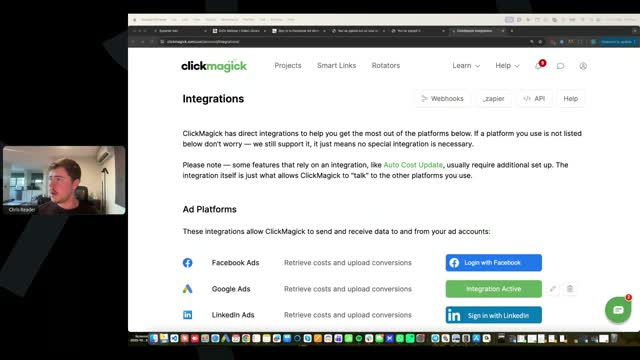
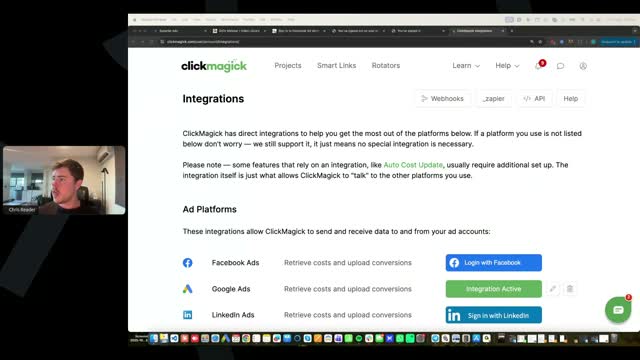
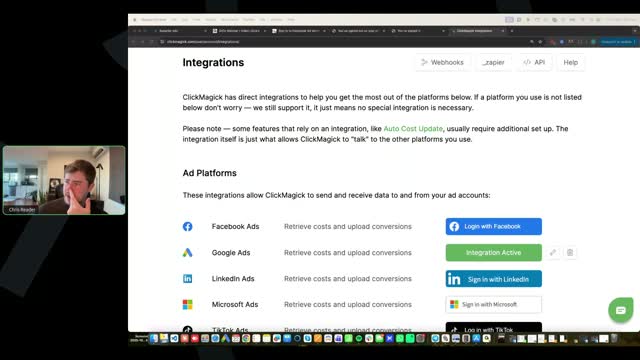
[14:14] Chris Reader: Alright, awesome. So what you want to do guys, I've shared this before but I just want to reiterate it on it. Uh you go, this is just again a test ClickMagick account, doesn't have my actual numbers and stuff in it. Um, go to your top right profile picture, select Integrations, and then you want to integrate with Facebook, okay?
[SCREEN 14:34] Chris clicks on the profile icon in the top right corner and selects "Integrations" from the dropdown menu. The page changes to "Integrations". Under "Ad Platforms", it lists Facebook Ads, Google Ads, LinkedIn Ads, Microsoft Ads, TikTok Ads. Next to Facebook Ads, there is a blue button "Login with Facebook".
[14:38] Chris Reader: So you want to press log in with Facebook and then you just want to follow the prompts, okay? So you press continue, log in with your user, and then it will ask you some things like select page, that doesn't really matter too much, but then it will specifically say like ad accounts and you'll be able to select your ad accounts, okay?
[SCREEN 14:40] Chris clicks "Login with Facebook". A popup window appears for Facebook login, showing "Chris Reader" and a "Continue" button. He clicks "Continue".
[14:57] Chris Reader: So this can help you with tracking. Um, but again, remember that we aren't able to track 100% of every single data point guys. You will typically track 80% on average, sometimes 90%, but on average 80%.
[15:16] Chris Reader: So that means not all your checkouts are going to come through. Majority of all your sales should be coming through though. There's a higher amount of sales that get tracked compared to checkouts, just the way DigiStore has those set up, okay?
[15:35] Chris Reader: So um, the other thing as well guys with sales, like for example someone here mentioned that they had some sales that were attributed as organic. Um, just the nature of running ads right, like if someone clicks on your ad, they go to the URL, they then copy the and then they got to go somewhere right, they might copy the VSL and send it to themselves on their phone and then they might watch the VSL on their phone while they're like in an Uber and then they might buy, okay?
[16:08] Chris Reader: So that has now broken the link to the direct ad. So if someone does that, then it's not going to be able to track back to the exact ad because it's not on the same device, it doesn't even register as like the same person, right?
[16:26] Chris Reader: Um, so that is why some sales can potentially show as organic. It's also why some sales might not track. But this is pretty much the case for every single tracking tool guys and anyone running ads. Um, the reason why only like 80% of stuff tracks is because Apple prevented like cookies, okay?
[16:48] Chris Reader: So Apple like prevented track, like Apple kind of blocks these tracking things. So that is why this happens. And it's not just for this guys, it's for like any business running ads. It's not just affiliates, it's not just DigiStore, it's not just ClickMagick, it's pretty much every business uh and it's and it's related to Apple, okay?
[17:13] Chris Reader: So you know, so Jeff I can see, you know, so some people are saying they're getting like a lot of checkouts but like barely any are showing, so like not even 80%. So my, if if barely any are showing, you need to make sure uh you have all of your tracking links set up correctly within your Facebook ad tracking parameters, alright?
[17:41] Chris Reader: So when we set up those links, okay, so you need to make sure you have all of the links set up correctly, okay? So you need to make sure you have your CMC vid and your parameters all set up correctly, alright?
[18:00] Chris Reader: If you don't have them set up correctly, then it's not going to track correctly, okay? Um, also of course make sure you have the ClickMagick tracking code on that redirect page in the header, okay?
[18:19] Chris Reader: So that that's the biggest key. Uh if you don't have that set up, then it's not going to, um, it's you know, you're not going to be able to have like proper tracking. If you don't have the the parameters set up correctly across all your ads as well.
[18:36] Chris Reader: Uh someone just asked, if tracking doesn't occur, uh would we lose commission on the sale? No, okay? So you always make your commission on the sale. So even in that example that I said where someone like copies the URL and then puts it onto their phone or something, the URL has your affiliate link embedded in it, okay?
[18:57] Chris Reader: The tracking is just being able to track that onto ClickMagick, but DigiStore is, DigiStore always collects your commissions. It always, you'll always get in commissions. So if something's not tracking on ClickMagick, it's still going to be coming through on DigiStore and you're still going to be making money, okay?
[19:19] Chris Reader: The other thing as well guys, is we make all of our decisions in ClickMagick, okay? So ClickMagick, the reason we use ClickMagick, okay, and I'm just going to show you another thing here, is sometimes when we're tracking sales on ClickMagick, sometimes that then can't get passed through to Facebook for whatever reason.
[SCREEN 19:36] Chris navigates back to the "Projects" -> "Insights" page in ClickMagick.
[19:45] Chris Reader: It should definitely be getting passed back to Facebook and again make sure you guys have your integration set up. But when we're making decisions on ads guys, we're doing it within ClickMagick, okay?
[SCREEN 19:50] Chris clicks on the profile icon and selects "Integrations" again, then goes back to the "Projects" page.
[20:00] Chris Reader: So specifically for cost per engagement um and sales, we're making those decisions based on the data in ClickMagick and then we look into Facebook and we just turn, we make the adjustments on Facebook, but we're doing the analysis in ClickMagick.
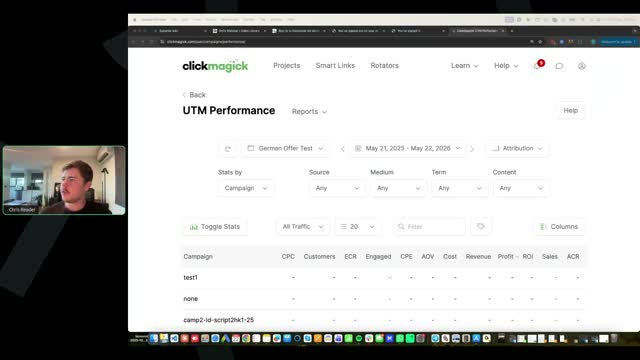
[20:18] Chris Reader: So guys, this is the best way to do your analysis process. So you want to come into report, so make sure you're in your project, come into reports, select UTM performance.
[SCREEN 20:25] Chris clicks on the "Reports" dropdown menu and selects "UTM Performance". The page changes to "UTM Performance". The date range is "May 21, 2025 - May 21, 2026". The table shows columns for Source, CPC, Customers, ECR, Engaged, CPE, AOV, Cost, Revenue, Profit, ROI, Sales, ACR.
[20:33] Chris Reader: Now obviously I don't have anything in here, this is just a test account, but this will show you all your ads. Uh and then you want to go sort stats by and you can select source, medium or so on.
[SCREEN 20:44] Chris clicks on the "Stats by" dropdown menu, which currently shows "Source". The dropdown options are Source, Medium, Campaign, Term, Content.
[20:52] Chris Reader: So um, get familiar with this screen is all I can say. This screen here is the best process for analyzing data easily, okay?
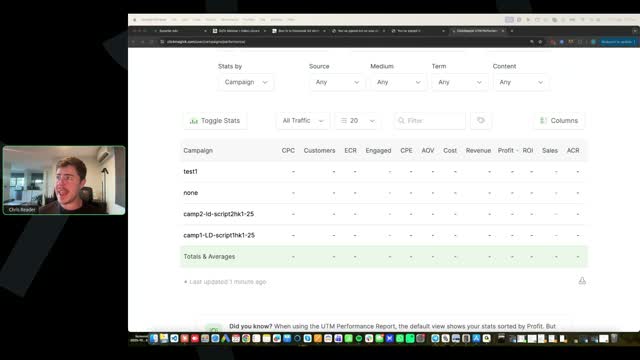
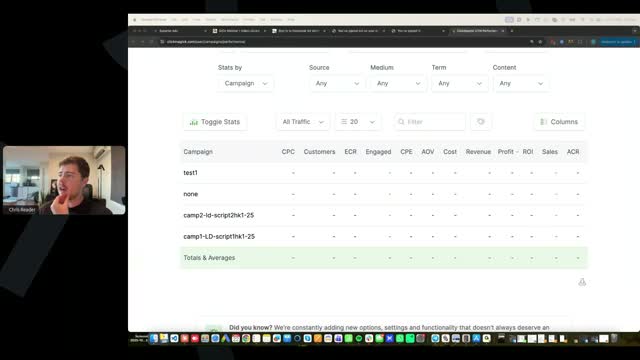
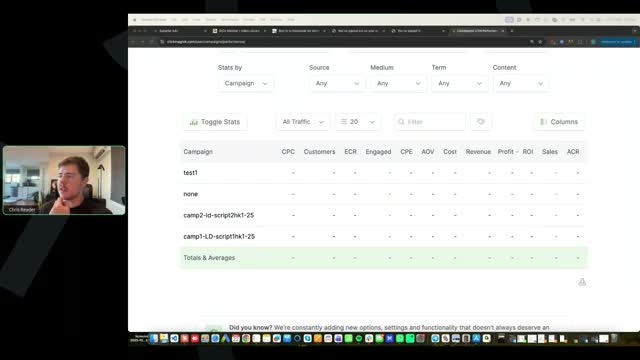
[21:05] Chris Reader: So you can select uh specifically you know campaign, right? Because campaign is where you have all of your campaigns. You know, you can see here we've got campaign one, script one, hook one, campaign two, script two, hook one. So you will see all your campaigns in here when you sort by campaign, alright?
[SCREEN 21:08] Chris selects "Campaign" from the "Stats by" dropdown. The table updates to show rows for "test1", "none", "camp2-ld-script2hk1-25", "camp1-LD-script1hk1-25".
[21:29] Chris Reader: And then you can select you know today, which I don't have any data, this is just a test account, but you can select right today, you can go to yesterday, the day before, and then you'll be able to see the performance of every campaign.
[SCREEN 21:31] Chris clicks on the date range selector and shows the dropdown options: Today, Yesterday, Last 7 Days, Last 30 Days, This Month, Last Month, This Year, Last Year, All Time, Custom Range. He selects "Today", then "Yesterday".
[21:45] Chris Reader: Okay, and again because Facebook might not, you know, ClickMagick might show four sales and maybe only two are showing on the Facebook, well then you'll be able to see and make your decisions in this screen here, okay?
[22:05] Chris Reader: So you'll be able to make your decisions in this screen here, alright? Okay.
[22:12] Chris Reader: Alright guys, so overall guys, a lot of people are making sales, I can see in the chat, people are also making a decent amount of money, but people are just uh asking a lot of questions about the tracking, so that's like the main sort of thing that I'm seeing here.
[22:28] Chris Reader: So again remember guys like unfortunately just we don't get 100% attribution, it's just it's the way it is for every single business and unfortunately, you know, at the early stages it can be frustrating, right?
[22:42] Chris Reader: Like someone here said you know I've made uh you know made like two sales and only one of them tracked or I made a sale and none of it's not tracking, you know that's a very small sort of data point.
[22:54] Chris Reader: But the reality is when you start getting more volume, it becomes less concerning because yeah if you make one sale and it doesn't track, that's 100% of your sales not tracking. But if I'm making you know 100 sales a day and I'm getting 85 of them tracking, that's 85 data points that I can then make an assessment of, right?
[23:19] Chris Reader: And obviously I know you got to scale up and you know you obviously got to get to that volume and but I'm just saying when you're first starting out like it seems more concerning than it is because you don't have as much data in there, okay?
[23:33] Chris Reader: Um, but obviously you know tracking is a part of the game and it can be frustrating and it's again it's just a part of the game that we have to navigate with, alright?
[23:48] Chris Reader: Okay, so someone said if you make all your decisions in ClickMagick but spend is half of what is spent on Facebook, it's not exactly accurate. Yeah, so what I do guys is I'll have like my Facebook account up and my ClickMagick and I'm flicking between the two.
[24:04] Chris Reader: The key is like we just need to use both platforms to make decisions, but again like I'm just saying that I use this because some people are saying oh it's not tracking on Facebook and well then it's like you know you don't just make your decision on Facebook or ClickMagick, you know we we kind of flick between the two.
[24:24] Chris Reader: Um, but with the spend not tracking guys, let me know if you guys are not seeing your full spend tracking because if you have your integration set up, your spend should be tracking into ClickMagick.
[24:40] Chris Reader: However, you do guys need to also remember that ClickMagick is on a timer, so it's not a live, it doesn't track live. So you know, especially when you start spending a lot per per day on campaigns like I do, um you know, sometimes my Facebook account will spend you know some, my Facebook account will spend...
[25:00] Chris Reader: spend, you know, $300, right, by the time my ClickMagick updates. So I might have like one campaign, because ClickMagick updates its costs every hour, I'm pretty sure it's every hour or so. And so that way it pulls in the spend like every hour or so. You can even see it says like updated one minute ago. I've never even noticed this to be honest. But from what I've noticed, it updates like every like, I don't know if it's 30 minutes or an hour, but there are times where on ClickMagick, for example, when I'm running high spends, my profit will look crazy good because, right, because for example, it's pulling in my sales, it's pulling in my sales and I, and but it hasn't pulled in the costs.
[SCREEN 25:00] The screen shows a ClickMagick "UTM Performance" report. The date range is "May 21, 2025 - May 22, 2026". The table has columns: Campaign, CPC, Customers, DCR, Engaged, CPE, AOV, Cost, Revenue, Profit, ROI, Sales, ACR. The rows are "test1", "none", "camp2-ld-script2hk1-25", "camp1-LD-script1hk1-25", and "Totals & Averages". All data cells show "-". Below the table, it says "Last updated 1 minute ago". A tooltip at the bottom says "Did you know? When using the UTM Performance Report, the default view shows your stats sorted by Profit. But you can click on any column header to sort by that column in either ascending or descending order." Chris Reader is visible in a small video tile on the left.
[25:54] Chris Reader: So for example, in like that hour, I have pulled in like 10, 20 sales, but then the costs haven't pulled in yet. So it looks like my ROI is massive and then as soon as the costs get pulled in, you know, the ROI, like the costs come in and then the profits obviously decrease and the ROI is stabilized, right? So it is important to make sure you understand that it's not live, okay? It's not live ad spend, it has to get pulled in. And I believe it pulls in every hour, okay?
[26:27] Chris Reader: The other thing as well from what we've heard from you guys is some people's spends aren't pulling in unless it gets a click, okay? So ideally, like, you know, if you've got campaigns that have spent $100 and have not got a click, then according to ClickMagick, it won't be pulling in that spend. But our goal is to be getting $1 per click. So, you know, as long as you're hitting that benchmark, all of that spend should be coming in.
[27:08] Chris Reader: Now someone just said my full spend does not track. All right, well, if you're not getting any spend tracking, then you need to make sure that you have followed the training here and do audience optimization, you know, you've set up your pixel here, and then of course also do the integrations because your spend should definitely be tracking. Okay.
[SCREEN 27:12] The screen changes to the ClickMagick "Projects" page. The date range is "May 21, 2025 - May 22, 2026". The table has columns: Clicks, CPC, EPC, Cost, Refunds, Profit, ROAS24, ROAS, ROI, Actions, ACR, CPA, EPA, Revenue, Initial, Upsell, Backend, Recurring. The "Clicks" column shows "8", all other columns show "-".
[SCREEN 27:18] The screen changes to the ClickMagick "Audience Optimization" page. The "Facebook Ads" tab is selected. It shows a "Dataset" ID "2016990279241938", "Event Name" "Purchase", and "Website URL" "http://direct-lifenews.com/offer".
[SCREEN 27:25] The screen changes to the ClickMagick "Integrations" page. Under "Ad Platforms", it lists Facebook Ads, Google Ads, LinkedIn Ads, Microsoft Ads, and TikTok Ads. Facebook Ads has a button "Login with Facebook". Google Ads has a button "Integration Active". LinkedIn Ads has a button "Sign in with LinkedIn". Microsoft Ads has a button "Sign in with Microsoft". TikTok Ads has a button "Sign in with TikTok".
[27:45] Chris Reader: All right. Okay. So, all right. So let's jump now into some sort of technical questions, guys, and we'll jump into some stuff. And I also want to jump into some ad creative stuff as well. So we can go over different things on this call. But let me go ahead and answer all the some of the questions that are in here, guys, and then we can sort of open it up. All right.
[28:15] Chris Reader: So yeah, someone even just said, yeah, here. So just like as I mentioned, guys, ClickMagick can't track spend for ad sets that don't have any clicks. So if you guys have ads that aren't getting any clicks, it doesn't register in ClickMagick and it can't pull that spend in. But again, our goal is to optimize for a $1 cost per click. So as long as you're hitting that benchmark and your ad account spend enough to hit that benchmark across your ads, then it will come through, okay?
[28:48] Chris Reader: Now, the reason why it's becoming more apparent that the spend isn't tracking for some of you guys is the strategy we are using of the one ad, $1 per ad, means that, you know, you might have 20 ads that have spent just under a dollar, but overall they've spent like $20, but they haven't got a click yet. Or like 20 of those ads or 50% of your ads haven't got a click yet, but they've spent like 50% of your budget. And then that is accounting for the reason why they're not coming through. Whereas if we were only running one ad, that one ad will 100% get a click if it spent $20 because it would probably have 20 clicks.
[29:36] Chris Reader: But the strategy of the 20 ad duplicates is by far performing the best out there right now. You know, we were contemplating of teaching the 20 ad strategy in like the advanced method, but we didn't want to because it's just converting so well. We don't want to handicap you guys with a simpler, easier method to teach and run, but it limits your results. So that's why we've taught this 20 ad strategy because it is by far performing the best out there.
[30:10] Chris Reader: Someone said is checkout the same as an engagement? Yes, it is. That's correct.
[30:21] Chris Reader: So Chloe just said here, I've made a sale about three weeks ago and I have not been able to make another one. I've tried different ads, different opening scenes, even tried another niche. And Tony always said to use my ads and test new ad accounts, so I'm doing that, fingers crossed. Yeah, so the biggest thing is what are your stats? You know what I mean, guys? Like what are your stats? Like how many ads have you tested, right? So it's not just about different opening scenes, different ads, it's about doing it in a structured process that you can replicate and follow.
[31:01] Chris Reader: And of course, your stats, right? Like if you're not getting good cost per clicks, if you're not getting good cost per engagements, like these all matter. So just hearing that oh I've ran ads and I'm not making sales, it's like, you know, the training has a specific structure that we need to be following. So you need to make sure that you're following that structure. For example, you know, are you doing the exact strategy that I teach in the training to replicate ads, right? Like we're all working from the same ads here and we should all be doing the, you know, 50% of your ads are very, very similar with just unique hooks. 50% of your ads are, you know, following the prompts that I've provided you guys are replicating those bodies, okay? So making sure that the bodies have all of the key psychological points but they're just slightly different. And again, I teach you guys in the video of how to do that with those exact prompts, all right?
[32:10] Chris Reader: Okay, so you've tested 15 ads. Again, what are your stats, right? So we need to make sure that we're following our the stats. That's the biggest thing, making sure that we're looking at the stats, okay?
[SCREEN 32:24] The screen changes to show Chris Reader in full screen. He is sitting in a room with a kitchen visible in the background.
[32:29] Chris Reader: Someone said, did you say 20 ad strategy? Yeah, so I'm talking about the strategy where we have just heaps of ads, duplicates of the exact, like when we test an ad, we have like, you know, 20, 25 duplicates, right? That strategy is what I'm talking about.
[32:50] Chris Reader: All right, let's jump into the ads here. So someone said, all right, two questions about scaling. If you're scaling to 10k a day, are you using the $1 per ad set method? And if so, that means you're using 40 different Facebook pages, question mark. Yeah, so the $1 per ad set method that we teach in this training is the exact strategy that we're using. Again, because it's just converting better than anything else out there. There is other strategies, like again, you can test other strategies when you get to scale. Like for example, not doing the $1 ad strategy, you know, you could just do the standard strategy and see if that works. But yeah, even to get to $10,000, even higher, the $1 per day strategy is working. And it just yeah, requires you to have multiple different Facebook pages. That's the only limitation. You can run 250 ads per page. And so yeah, as you start scaling up, you will need a lot more different Facebook pages. But again, you can also test when you get to scale, you can test just the standard strategy where you've got like $50 per ad and then you don't need tons and tons of pages. But again, the strategy we're teaching you with the $1 per ad is what is performing the best right now.
[34:25] Chris Reader: All right, let me jump into here. So all right, DJ, I've made $2,000 in commissions in the last eight days. Nice work, congratulations man. That's awesome. However, the tracking is not helping. ClickMagick only shows where four of the sales are coming from. Checked all the tracking and they look good. Yeah, so again, when you've made 10 sales and only four are tracking, again, make sure you have your integration set up, make sure you have all of the tracking parameters set up, okay? Like maybe if you've got multiple ads running, maybe like only some of them have the tracking parameters set up correctly or just make sure that there's no issues like that.
[35:09] Chris Reader: But then, you know, we have to work with the data that we have, you know, and it does suck early on when you're in this stage because yeah, you know, you could, you know, if you had all of that visual data, it's ideal. But you have to work with what you've got, right? So out of those sales that are showing, out of those $2,000 in commissions that are showing, what ads are getting the highest checkouts, right? What ads are getting the cheapest cost per checkout? What ads are getting the most sales? And focus on those ones, okay? Focus on those ones and focus on scaling those ones up. Because even with not all of the data tracking, you still will have a lot of data. You still will have, you know, you've still got a decent amount of sales in there tracked, a decent amount of checkouts in there tracked to make your decisions, okay?
[36:05] Chris Reader: And yeah, you know, through the process, if not everything gets tracked, yeah, sometimes you will, you know, you might turn off an ad that has a high cost per engagement, but it could have another engagement, but you don't know. But we have to work within the data we can see. So that's why I'm always just focusing on the data I can see within ClickMagick. So I'm looking at the sales and the checkouts, okay? And that's what I'm focusing on.
[36:45] Chris Reader: So for ClickMagick, is it both Facebook integration and also anything else you teach instead of the pixel? So it's the pixel set up with the audience optimization and then also the integrations. Okay, so they're the two things for the setup there with ClickMagick.
[37:06] Chris Reader: All right, so someone here said, so I've made nine sales. Nice work, Natalia, that's awesome. That would be like probably like $2,000 as well potentially in commissions, which is awesome. The other cool thing about this as well, guys, $2,500 in commissions. Yeah, guys, drop your success in. Everyone's like, oh, I've made 10 sales, I've made 15 sales. But guys, drop the actual commissions that you guys are getting, you know, $2,500 in commissions so far is awesome, you know.
[37:39] Chris Reader: The other great thing as well, guys, is again, because you're running, you know, there's such a high hit rate. You guys, like so many of you guys are starting to make sales. Also, so many of you guys are starting to make, you know, $2,000, $5,000. Some people are even doing $10, $20,000 so far. Because, but let's just focus on the people that have made, you know, $1,000, $2,000, $3,000, right? This is all just feeding back into your ad spend, right? So even through this process of before you have found a winner, you have now made $2,500. So you're probably in profit, but even if, yeah, you'd probably be in profit by now because that's, you know, a lot of commissions, $2,500 running only $25 campaigns here. You will be able to then fund your future ads, which is the whole process, right? Like especially even when you guys have ads that are breaking even, guys, that's like the perfect scenario because you're not even down, you're like funding yourself. Your ads are like basically perpetuating themselves, right?
[38:58] Chris Reader: So the question here is, all right, nine sales, do I scale the one with the lowest CPE? So you want to scale based on the testing protocol. So if some of your sales are not tracking, yeah, focus on like which ones are getting the lowest CPE and which ones are actually showing the most amount of sales, okay? So out of all the sales that get tracked, again, what does the data in ClickMagick say, okay? So you're saying your CPEs are 30 to 50 euros, which is amazing. 30 to 50 euros, that's brilliant. So and then what ads are making the most sales, right? And then you want to, you want to scale those.
[39:49] Chris Reader: But guys, remember whenever you're scaling ads, you also want to be evolving them. All right, so it's really important that it goes hand in hand. So if you have ads that are making profit or making sales or you want to scale, you scale, but you also test following the evolution method. So you should always be scaling, but then you also always want to be testing one stage of the evolution method. So to begin with, you know, opening visuals. Because as you scale this campaign, that's your original one, right? So you've got your original campaign here, you want to scale it, cool. You bring it up here and you scale it. But you also need to be doing at least, I would say, two evolutions of it. So for example, the first stage is the opening visual. So opening visual, opening visual. Because you might find that this new one performs even better than this one, okay? Or you might find that you now have two that are profitable. So that's the most important thing.
[40:50] Chris Reader: All right, so Natalia says I've got two winning hooks and one winning opening scene. That's awesome. All right, so that's great. So if you've got two winning hooks and two winning opening scenes, I would duplicate all of those out. All right, I would duplicate all of those out. All right. All right, so yeah, but you're still not scaling. So yeah, Natalia, I would begin scaling those, okay? You also get more consistency with scaling, guys, because you're getting more ad spend in the game, okay? So it's kind of like adding more fuel to a fire. So like you might have a fire, it's making sales here and there, but it's kind of like dwindling and it's not like very consistent. And the more fuel you add, like the more you scale it, the more data Facebook has, the more money it has, the more data it gets, and the more consistent it becomes. So yeah, if you've got two winning hooks and one winning opening scene, I would scale them. And then again, you can then spot which ones are the strongest performers within those, okay?
[41:56] Chris Reader: Um, also you asked, should I start with 151 on the ad set level? Yeah, definitely you can do that for those. Because again, you're going to be spending more money within that campaign to scale it up, so that's great.
[42:11] Chris Reader: John, you just sent here, you made eight sales, 1,400 euros, which is great. However, you're pretty much breaking even right now, which again is a good situation, guys, right? Like if you're breaking even, don't think of it as like a negative. For you guys to be breaking even so close into running ads is like a very, very good sign, okay? Especially, you know, if you guys have come from other trainings and stuff and you guys have other experience with affiliate marketing, you know, to be able to be making this amount of, this volume of sales so early on is like massive, right? So if you're breaking even, it's not a negative, that is the perfect situation.
[42:56] Chris Reader: Every scenario, guys, with running any ads looks like this. First, you're negative, okay? That's the first stage, you're negative, right? Because you're, especially, you know, you've got to find offers, you've got to test different ads. So you're always going to start out negative. Even with this, you will start out negative, okay? Because, you know, you'll spend $20 on an ad without a sale, so now you're negative $20. Then you'll test another ad, spend $20 without a sale, now you're negative $40, right? That's a part of the game. But we're gathering data, that's why we, that's why we have this strict testing process and the evolution method. But then you will find ads that are now making you sales, right? So in this case, you know, you spend $100, you make $100 back. Now you've, you're negative $0. Then you might spend $300 and you've made $300 back. So you're still negative $0. So you're going to be negative, then you get into a stage where you're making sales and you might be slightly negative, slightly positive, break even. That's a, that's where every single campaign ends up at one point. You will always be in these stages, it's inevitable to be in these stages.
[44:10] Chris Reader: The goal from that situation is firstly, it's good because now your ad spend is covering itself. All right, now you're like, you know, you're not actually putting any extra money in, it's covering itself. But the goal from that position, for example, John here who's made eight sales, you know, made 1,500 euros, spent around 1,500 euros, the goal is to identify which ads are converting the best, which ads have the lowest CPE, and then we trim the fat and optimize, okay? So we trim the ads that are not performing, okay? And then we optimize through the evolution method, and then we find those ones that are in profit, okay? So that's always the three scenarios. You're always going to have a new campaign that's, you know, starting negative. Obviously our goal is to limit how negative we are following the testing protocol, following the structures we've got. But then you'll always have ads that are breaking even, or slightly positive, slightly negative, break even. And then we trim the fat, we do the evolution method, and then we find the ones that are in profit, we scale, okay? So don't be scared of these scenarios.
[45:24] Chris Reader: But again, so many people here are already making thousands of dollars in commission and are already in this second stage and third stage because again, you guys do not need to spend $1,000 testing like three different offers or four different offers and then all the ads, because we're giving you the winning ads, we're giving you the winning offers. So getting into this middle stage and third stage is so much faster because you have literally 90% less work to do, okay? And less to test because all your ads will be tested based on winners.
[46:06] Chris Reader: So a question here, I'm curious on how we create ads that look exactly like yours when our script is different and not word for word. Yeah, so you're not meant to, it's obviously not meant to look exactly identical. As you say here, you've been trying to copy the essence of it, exactly right. So you need to make sure your ads visually are at the same quality of the ads that we have, okay? Because, you know, even when we've been doing ad reviews, a lot of the ads have been falling short of like the quality and the essence, right? You need to make sure your B-rolls are engaging. You need to make sure that they're actually looking good. You need to make sure that they actually have the correct, you know, concepts within them. And again, the best way to do that is by like basically emulating our winning ads. Like you will notice that the winning ads that we share to you guys all pretty much have the exact same sort of essence, the exact same quality, the exact same pacing, the exact same, you know, B-roll cadence, the exact same quality. All right, even though they're all completely different scripts, they all have that same quality, which is what you're trying to replicate, okay?
[48:43] Chris Reader: Someone just said, can you post the Facebook ad metrics on the Notion document? Guys, the metrics are on the Notion document there. You know, in terms of what your goal CPE should look like and, you know, the goal cost per sale, etc. So hold on guys, I'm trying to find, here we go, boom.
[49:05] Chris Reader: Wu Li, you posted in here saying that you've made consistent sales and you're trying to scale up. So I'm trying to find, here we go. All right, you wrote, my average ROI is 20% with 50 ad sets, should I scale? I'm getting sales occasionally and worried this is not good enough to duplicate my ad sets. So firstly, Wu, can you share, you know, some of the results that you've been getting? Because if you're already scaling, you're definitely probably doing some good results and probably making a lot of commissions. So it's just good to share with everyone to get everyone excited and show everyone the kind of numbers people are doing, because I know people are doing big numbers right now, but not everyone has been sharing the amount of commissions they've been making. So it'll be good to hear from you on that side.
[49:51] Chris Reader: But then to answer your question, all right, so Wu is in a position here where they have scaled their campaigns, all right, they've got 50...
[50:00] Chris Reader: Right, they've got 50 ad sets, so 50 ad sets at $1, they're doing the next level there. When you scale, you know, you can do the 25 and then the 50 strategy. You can even scale to 100 ads guys, 100 $1 ads as well. And you can even test 200 $1 ads as well, okay? So there are these levels. Now, when you first start, we recommend doing the 20, 25 ads at a dollar, because then you're spending 20, around $20, $25 per ad, which is what you want to be, like that's a good amount per ad, okay? Especially when you're starting, right?
[50:41] Chris Reader: But then when you have an ad that's been verified and it's working, you want to scale it, obviously you can put more money behind it. So yeah, Woo, you know, you can test 100 ads, so 1-100-1. All right, if you're doing 20% ROI, I would say scale it. All right, you guys are on CPA here, so I would definitely scale that, because you know, making money is making money. Plus, when you duplicate ad sets out, some ad, sorry, when you duplicate campaigns out, some campaigns will make more ROI than others. It's just the nature of, you know, that's why we do the horizontal scaling.
[51:18] Chris Reader: Because one campaign might make 20% ROI, but you duplicate that campaign out two, three times, you know, one campaign might not work at all and you turn it off, which is normal. Another campaign might make 20% ROI again, but then your third campaign might make 150% ROI. Okay? It's just some, when we do the horizontal scaling method, some perform differently. All right?
[51:48] Chris Reader: Now, on top of that, what I would recommend, Woo, is like I said, when we're scaling guys, we always want to be evolution scaling on the side. So as we have, if we have something working here, like in your case, Woo, you've got 20% ROI, you're already at a scaling stage where you're doing 1-50-1, yeah, duplicate that out, scale it, but always evolve guys, always, always, always evolve. And it's not just do, oh, I'm just going to evolve it once, I'm just going to test new opening scenes. It's you need to work through the evolution method.
[52:27] Chris Reader: Even if you're profitable guys, even if you're profitable, okay? So even if you're profitable, like in your case, Woo, right here, is a perfect example, right? Even if you're profitable, you're spending, you know, you've got 20% ROI, you should be testing new opening scenes, you should be testing new hooks, right? Testing new opening scenes might give you, for example, let's just say a 10% bump in ROI, so now you're at 30%. Then we evolve it again, we test new hooks, we find a new hook, right, we find a new hook, that's another 10%, so now you're at 40% ROI. Then you test, you know, new avatar, you test new avatars, that might give you a 20% jump, so now you're at 60, 70% ROI, right?
[53:15] Chris Reader: So it's important to follow through the evolution method and do evolution scaling as you go. We never just want to settle with one ad making 20% ROI. Like, you want to scale it because it's making you money, but you also need to be doing the evolution method here, because if you have an ad making you 20%, I guarantee you find a better opening scene, you find a better hook, um, you follow the rest of the evolution method, that will easily be able to get to 100% ROI.
[53:44] Chris Reader: And then you've got the original ad making you 20% ROI, which could be making you two, three, $400 a day. You've got the different version of that ad that's getting, you know, 80% ROI, 110% ROI, that could be making you $1,000 a day. And so now you've got two different ads, one's making you like $200 a day, one's making you like $1,000 a day. So the goal is we want to find as many variations of winners as possible and we scale them all up as we go, okay?
[54:16] Chris Reader: All right, so someone here said, um, someone here said, I'm breaking even with my ads and commissions, uh, I've made around seven or eight sales. I'm not sure if you're, like, and it's been a month or so of running ads. So I'm not sure if you're like complaining here, but breaking even again is a good scenario. And you know, you've only made seven or eight sales, so if you're breaking even, double how much you're testing, you know? You've only made seven or eight sales, double the amount that you've test, you're testing. Focus on what's making sales and optimizing, right? Like again, you need to be working through the evolution method here guys, testing different opening scenes, testing different hooks, testing different actors, focusing on the winners, okay?
[55:14] Chris Reader: All right, uh, Natalia, Antonio said that all the Loom ad account reviews are up to date. So, um, can you check, Natalia, if yours has been done? And if not, make sure you're submitting them in the correct, are you, are you submitting them in the correct place? Guys, the ad account Loom reviews should never be sent to support, they should be added to the correct place. All right, they are. Let me look. Um, can you resubmit it maybe? Antonio said they're all up to date. Oh, he's watched it. Okay.
[55:58] Chris Reader: So guys, with the Loom reviews, uh, the ad account reviews, it's important that you follow the structure we said, uh, you know, and then Antonio and I will, will add it to the drive. So I'm just updating him there, uh, Natalia, to see what's going on for you.
[56:13] Chris Reader: All right, so if testing new opening scenes doesn't give you a better result, do you go to testing new hooks? Yes. But yes, the evolution method guys, not every stage will give you a better improvement. So if you are testing new opening scenes and you haven't seen a better improvement, but guys, remember, right, a better improvement could be, is like a lower cost per click. But let's say you're testing new opening scenes and none of your new opening scenes is either getting better cost per engagement, sales, or a lower cost per click, then yeah, move to the next, right? Keep your same original opening scene and move to the next, test new hooks.
[56:54] Chris Reader: Um, and then if, you know, your new hooks aren't performing better, move to the next, right? But ideally, I would be testing like three to six opening scenes, three to six hooks, um, and so on. But you shouldn't just like, oh, if stage one didn't improve anything, then I just don't follow the rest of the evolution method. You have to work through them, but yeah, not every single stage will give you an improvement, okay? Typically it should, and it would, because, you know, we're, we're trying to even just get an improvement such as a cost per click improvement, right?
[57:33] Chris Reader: But, um, guys, that is all for today. I do have to jump here. Uh, but let me answer some questions here. Uh, someone said, would $2 25... So guys, so this is a question here. So the strategy we teach you guys is we call it 1-25-1. So that means you've got one campaign, 25 duplicates of the exact same ad. So every campaign should be one ad pretty much guys, and then we have 25 duplicates of it. So each campaign should be a unique ad.
[58:16] Chris Reader: So as you guys know, the strategy is 1-25-1, um, and then also 1-50-1, and 1-100-1, and then even 1-250-1, right? Like you can even test that if you wanted to. Um, and you might find that 1-50-1 works the best for you and you just scale those. Or you might find 1-100-1 works really good and you scale that.
[58:42] Chris Reader: Um, now someone here asked a question, how about doing, you know, the 1-25-1 but doing $2 per ad set? So that way we're actually spending $50. Or they've even asked, what about 1-25-1 with $4 per ad set, so we're, we're actually scaling more? Look, you can test that strategy. I wouldn't test it until you've already started, you're already in profit making $1,000 a day, all right? I wouldn't test anything different than what we teach guys unless you're making $1,000 a day profit. Because you can be making easily $1,000 a day profit with what we've given you.
[59:27] Chris Reader: And all of these experiential, experimental things, for example like, oh, what if I do 1-25-1 but I have, you know, $4 per ad set so I'm actually spending more money? You can test that. You can definitely test that. Um, we've tested it, and typically, again, the $1 thing works better overall. But again, some ad accounts are different, you know, you might do the $4 for 25 ads and it might work really, really well in your campaign. But so I would say test it, but I would say, um, don't test it right now. Just focus on what we've taught, because focus on what is known, get to a place of financial profitability, and then test it and experiment at that point, okay?
[1:00:20] Chris Reader: But yeah, it's definitely something that you can test, 100%, right? That's definitely something you can test. I think someone else in here was already doing like $500 a day in profit, and I believe they were just adding more ad sets to their campaign. For whatever reason they just decided to do that and I don't know if they thought that that was the strategy we taught, but they did that and it was working. Again, I wouldn't recommend you guys follow that, but I'm just saying there's different things that can work. But I'm saying follow on what we teach until you get into a place of financial profitability where you can experiment then, if you want.
[1:00:56] Chris Reader: Um, all right, final thing before I jump off here guys, last thing. So Antonio on the last call was talking about different hooks, such as the oat trick and things like this that you guys may have heard from Antonio. So on the back end guys, for these offers, we are always testing new versions of these offers, new hooks for these offers and these VSLs. Uh, and there is one called like the oat trick that's been working well.
[1:01:24] Chris Reader: And we also have new offers coming out, I forgot. Uh, diabetes offer that's been absolutely crushing it, we're going to have launched for you guys soon here as well. Um, and yeah, new versions of the weight loss offer that, you know, the current one's the ginger trick, there's a new one that's like the oat trick. Me and Antonio are working out the intricacies of it, all right? We're working out the intricacies of it on how to structure it, um, and, and launch it to you guys, including these new mechanisms, these new hooks and stuff. So guys, we will give you an update on those, okay?
[1:01:58] Chris Reader: Um, keep running the ginger trick. Uh, you can even test the oat trick if you want guys, even though it's not going to be super congruent, it still can convert. But I would stick with just the ginger trick, maybe do an oat test trick here and there if you want to get experimental, but wait until me and Antonio give you the proper, uh, go ahead. And then someone asked, do the VSLs change? Yeah, so we're organizing that all for you guys, all right? We're going to organize it and tell you, all right, here's the new links, here's the new offer.
[1:02:30] Chris Reader: Yes, new offers, every new offer needs, every new niche needs a new pixel. Okay, every new niche needs a new pixel. And then someone here asked, is it the same German pixel? Guys, there isn't a German pixel, all right? There should never be a German pixel. It should be weight loss pixel, it should be memory pixel, it should be diabetes pixel. Every new niche is a pixel.
[1:02:58] Chris Reader: Um, okay. Uh, someone here said Monday is Memorial Day in the US. That is good to know. Guys, we will still be doing the live call on Monday, all right? So, um, the Monday call is still go ahead.
[1:03:13] Chris Reader: Someone said, do you set up new campaigns in ClickMagick for every horizontal scaling or are you using the same ClickMagick campaign link? Just the exact way I teach it. If you're asking that question, rewatch the video. Uh, it's the same way I've just shown in my video here guys. Every single...
[SCREEN 1:03:30] ClickMagick interface is shown. The "Projects" tab is open. A project named "German Offer Test" is selected. The date range is "May 21, 2025 - May 22, 2026". Columns include Clicks, CPC, EPC, Cost, Refunds, Profit, ROAS24, ROAS, ROI.
[1:03:30] Chris Reader: ...new campaign needs a new ClickMagick setup, otherwise how are you going to track anything? All right, just like this.
[SCREEN 1:03:36] The view changes slightly, showing a dropdown for "Stats by Campaign". The table below shows campaigns: "test1", "none", "camp2-ld-script2-h1-25", "camp1-LD-script1-h1-25".
[1:03:36] Chris Reader: This is the campaign one, campaign one, script one, hook one. Campaign two, script two, hook one. If we do not separate the tracking between our campaigns, every single thing will be tracking as the same thing, so they always must be the same.
[1:03:51] Chris Reader: But guys, I am super late for something here now, so I do have to jump off. Next session guys, as you know, Mondays are a lot more in depth, we can go over the hour. Also, um, also on top of that, I want to show you guys more strategies to speed up your ad creation process using Superior Ads, using the video editor, showing you guys how to speed up your workflow as well.
[1:04:18] Chris Reader: Chris, you've just asked, why don't you guys post the ad metrics with videos you post on Notion? Um, because they are in there. We have the goal cost per click, we have the goal cost per engagement, they're all in the Notion document, okay?
[1:04:31] Chris Reader: Um, can we use another new pixel in the same ad account or on another one? You can use it on the same one.
[1:04:41] Chris Reader: Um, can we run campaigns on a new page that's only been running engagement campaigns for two days? Yes, you can, DJ. He said, I need to scale ASAP. Yes, you can. Get to scaling, DJ, you definitely can.
[1:04:54] Chris Reader: All right, guys, I gotta run. Thank you all, today's been a great session. Um, congratulations to everyone making money, making sales, starting to scale. I'm excited for you guys. For everyone that hasn't made sales yet or is still sort of getting there, remember, you're not struggling, you're learning, all right? Reframe it. Every challenge is a stepping stone to success. Every failure is a stepping stone to success. Every ad that you launch that does not make sales or is not profitable is one stepping stone to success, right? We gotta climb the ladder to get to success, we can't just instantly be there. So every ad that you launch is one rung up the ladder or one stair up the staircase. It's just a matter of time. Make sure you're following the testing protocol, make sure you guys are following the strategy, and make sure you guys are implementing the training, right?
[1:05:43] Chris Reader: We've done a ton of ad reviews and, you know, not many, you know, we haven't done them today, but in the past a lot of the ads were not at the par of the ads that we were teaching. So make sure your ads are actually high quality, make sure you're following the training, and you guys will get there. But just remember, it's a journey, right? If we want to be making thousands of dollars a day in profit, we need to be willing to put in the work and we need to be willing to, to, to get there.
[1:06:09] Chris Reader: All right guys? And remember, don't get frustrated, it's a part of the game, it's a part of the journey, okay? Literally, when I first started, every failure is a stepping stone to success. If you run an ad and you're like, oh, and you, and you launch three, four, five ads and they all quote unquote fail and you get frustrated, you're not going to have success. If you have that mindset, you just literally will not have success, I'll tell you that right now. You need to have the mindset of, oh, this ad failed, but I learned this, I'm going to improve here, and this ad is just one stepping stone to the next ad that is better, to the next ad that is better, to the next ad that's making profit, and to the next ad that's making me, you know, scaling. All right?
[1:06:55] Chris Reader: So guys, that is all. See you guys all next week, we'll have a really good session then. Um, and yeah, I'm super excited guys, for everyone scaling, we can also jump into more stuff there as well. All right, goodbye everybody. I'll see you all soon. Goodbye everyone.
Call 13 of 13, recording 13-May 21 2026.mp4. Gemini video pass at one frame every 2 s. Rebuilt 31 Oct 2026 15:24 Melbourne.